56.1.4 Router/Timing Tab
In case the automation system is configured to manage a video router or master control, the following settings will be available:
router_timing
Skip
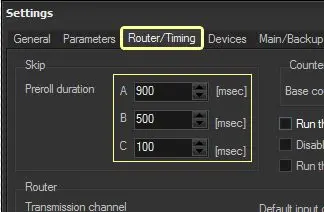
Preroll Duration - Set the duration of the prerolls to be managed by the automation:
Preroll
A - Mandatory, set the first preroll to be automatically activated at every startup. default 900 ms
B - Optionally, set a second preroll for manual user activation. default 0
C - Optionally, set a third preroll for manual user activation. default 0
Note: The preroll value depends on the video server's preroll and skip times and the router's preset time. Finding the correct preroll may need several fine-tuning tests; it's suggested to try switches with different properties such as: "Live (variable) -> File (fixed)" and "Live (manual) -> File (timecode)".
See also: How to change the preroll on-the-fly.
Turn off the Skip2Live command - If enabled, it won't be possible to use the Skip2Live button, which makes the automation skip from the current event to the closest next live event, skipping all the events scheduled before the live.
After enabling this option, you would need to restart Automation (Main and Clone) and Scheduling modules for the option to take effect.
Run the Re-cue after the D-still - If enabled, the automation will be positioned at the start of the current event (i.e. re-cued) each time the D-still button is pressed (for pausing the automation when the current event's playback finishes).
Run the Re-cue at every clip change - If enabled, the automation will be paused and positioned at the start of the next event each time an event's playback finishes.
Counter
Base counter offset - Use this parameter to set a fixed offset for the video server counter to compensate for any possible unnoticeable delays. It is suggested to leave this parameter as deactivated (i.e. set to 0 by default) and use it ONLY when it's strictly necessary.
Router
Transmission channel - Indicate the output channel of the router used for TX. For instance, if using an ETX Master Control, setting this parameter to 1 will be required.
You can leave this parameter to 0 if no router is in use.
Channel to set during an emergency live - Specify the router input channel to broadcast the emergency live, either directly from the On-Air interface or remotely from the Remote panel, EA1790 control panel, or GPI.
Although the channel is switched on an emergency live, the automation keeps playing the playlist, and once the emergency live finishes it skips to the next playlist event.
For example, the emergency live feature is helpful in directly transmitting a live event from a specific input channel when it is not intended (or possible) to broadcast the events initially scheduled in the automation playlist.
NB: This routing option is not operative on the NDI channel, as immediate switching to the NDI signal is impossible during NDI streaming. Etere suggests using Etere Master Control to switch to an emergency live channel and the Automation Off command to stop the Automation playlist when broadcasting an Emergency Live event.
NB: When entering the input channel number within the IP matrix, the channel is referenced to the input channel in the Master Control configuration rather than the input channel of the physical matrix.
Default input channel - Set the router input channel to be switched on if the automation is stopped or paused. Please note that the "STILL switches the router" and "STOP switches the router" must be enabled to enable this switch.
This parameter cannot be modified when the on-air Automation has started; you must stop the Automation, change and save the settings and restart Automation for settings to take effect. The default input channel is usually where the video server is cabled.
The advance of switching command - This parameter is used to manage the delay, the time in advance with which the automation sends the switch command ahead of the actual start time of the event. This time will affect the Preroll Duration as well. The advanced time would only take effect after the Automation restart.
Considering approximately 40 milliseconds per frame in the PAL video standard, set the value at 250 for better management of frames during clip change.
Force preset "n" seconds before switching - Automation will perform a preset of the following switch at "x" seconds from the end of the event. In case this parameter is set to "0", the preset event will go on-air as it is.
Always preset at the event's start even if not necessary - If enabled, the Automation will force the preset on all the events, including the sequences of video file events, using the same device input.
Automatic switches
STILL switches the router - Enable this parameter to change the router to a specific channel each time a "still" is executed. Indicate the channel to which the router will be exchanged among the following ones:
•Default channel: The channel is set in the "default input channel" in the Router section.
•On channel: A channel inserted here by the user. Please note that the "still channel" can also be set for specific transmissions using the "Remote Panel > Change the still channel" function).
D-STILL switches the router at the event's end - Enable this parameter to change the router to a specific channel when a "D-stilled" events end. The router's switch channel is set in the "default input channel" section.
STOP switches the router on the default channel - Enable this parameter to change the router to a specific channel each time a "stop" is executed. The channel to which the router will be switched is the "default input channel".
START switches the router - Enable this parameter to change the router to a specific channel each time the automation "starts" playing. The channel to which the router will be switched is the "default input channel".
Preset actions
The preset mode only: performs preset only, never take - Only the preset mode will be used if enabled.
Do not repeat preset on the SKIP command - If this option is enabled, Automation will not make any operation on the router/MC during the SKIP preroll. This way, the new input channel will be broadcast if the operator manually changes the preset on the router/MC.
Do not preset secondary events on the SKIP command - Activate this option to avoid any switch on the router/MC during the SKIP preroll of secondary events.
 router_timing