59.4.7.12 MediaInfo
The "MediaInfo" action type allows integrating the MediaInfo software installed in the computer where DataMover runs. ETERE integrates MediaInfo to retrieve the most relevant technical and tag data from video and audio files as per the following process:
1 - A workflow request to Etere DataMover to perform a MediaInfo task
2 - Etere DataMover launches a MediaInfo process to complete the request
3 - MediaInfo analyses the given file, storing all detected information (e.g. format, wrapper, audio, etc.) into an XML and TXT file
4 - The TXT file is automatically attached to the asset as a Do.Ma. document (for future consultation)
The XML file is automatically copied to a predefined location only if specified by the action ("copy result file to...").
5 - All gathered information is stored in the Etere database's related metadata (e.g. General, Video and Audio).
NB: A detailed list of all metadata stored in Etere is available in the MediaInfo Flexi-metadata chapter.
Moreover, using MediaInfo to retrieve file duration from clips would reduce the processing time. In the retrieved file, the asset duration is expressed in milliseconds.
Optionally, in case the FileInfo conversion is enabled, the gathered information is stored in the File Info section of the Etere's Flexi-metadata, and it will be compared against existing codec mapping to find the matching codec; if no correspondence is found, the "unknown" codec will be assigned to the metafile (and no metadata will be updated).
For MediaInfo to retrieve relevant information from the media, the media type must be defined in the "Media Info Codec Mapping" device settings.
NB: If an asset's Mediainfo is lost, it cannot be restored. There is no alternative way to recover Mediainfo other than the redoing MediaInfo process.
Note: Please refer to the MediaInfo software chapter for detailed information on this software.
Creating a new action
To create a new action, the following parameters need to be set:
Use all files with pathnames as written in the database: If enabled, Etere Data Mover will not search for files on the source path; it will read the video file's names and paths exactly as they are stored in the database, without altering them.
This option is useful too; for example, copy multiple files belonging to one metafile and name with different unique names.
Note: If using this option, MediaInfo will also update the database with the size of the examined file.
Generate file names with the following rule: If enabled, Etere Data Mover will not search for files on the source path; it will generate filenames based on the following options:
Supported environment variables
%0:s - The filename of the metafile exactly as stored in the database
%0:p , %1:p , %2:p , ... - The UNC/FTP paths inserted in the paths list.
- The comma symbol (,) allows entering separated parametric filenames for generating multiple filenames.
For instance, in case a metafile is called "clip" and the Path List contains three different paths (e.g. \\mtx\path0, \\mtx\path1 and \\mtx\path2), the %0:p%0:s,%1:p%0:s_1.mxf,%2:p%0:s_2.mxf string will make Etere DataMover to try to process the following files:
• \\mtx\path0\CLIP • \\mtx\path1\CLIP_1.mxf • \\mtx\path2\CLIP_2.mxf
Source path: Optionally, specify it here if files to be analysed are stored on a network /metadevice path different from the source device.
Read and merge ETX FileInfo: This option is used to update asset duration. If enabled, when several ETX file info is appended to the standard MediaInfo XML, the information is exported to metafile data in XML format and not added to SMPTE metadata. The only word used is the ETX frame count value for updating the asset duration.
The MediaInfo process always used ETX Fileinfo to update asset duration with this option enabled.
Convert MediaInfo data to Etere FileInfo Standard: If checked, the retrieved MediaInfo data will be converted and inserted in the Etere FileInfo metadata structure.
NB: If data conversion fails, uncheck this option and retry the data conversion. Etere MediaInfo has been enhanced to interpret metadata in the file better when processed by MediaInfo workflow action.
Update codec information: If checked, once MediaInfo data is converted into the FileInfo standard, the codec mapping will be applied (to set the correct codec matching the defined codec).
With this option enabled, it would probably prevent the destination codec been changed to the "UNK" (Unknown) codec despite the "UNK" codec being disabled in configuration settings.
Update asset data: If checked, MediaInfo data will be used to update asset data (e.g. duration). While updating the asset data, the asset title would not be corrected if it contained a title. If the title is empty, it would be replaced/updated by the relevant data retrieved by MediaInfo action.
Save result file on DB: This option determines whether the XML file containing the result information generated from the MediaInfo action would be saved into the DOMA database in SQL Server. By default, this option is disabled to lighten SQL Server workload and maintain Data Mover stability.
Set checked metafile as current in the workflow: If enabled, at the end of the job, the checked metafile will be set as the T-workflow's current metafile (i.e. the metafile against which later operations are performed).
Copy the result file to the following path: If enabled, DataMover will generate an XML file containing the result information retrieved by MediaInfo for the checked file.
The creation directory can be either entered into the path or selected by the cloud device (FTP paths are not supported).
The created XML file can be renamed according to the following rules:
- Append extension: Data Mover will append the inserted string to the video file's complete name (i.e., name+extension).
For example, if the file's full name is myspot.mpg, the XML file will be named myspot.mpg.MediaInfo.XML
- Replace extension: Data Mover will replace the video file's extension with the inserted string.
For example, if the file is named myspot.mpg, the XML file will be named myspot.MediaInfo.XML
Execution timeout (msec): Specify the maximum time to wait for the action completion before exiting with an error status.
By default, this time is 60000 msec (i.e. 1 minute); it can be disabled by setting it to 0 msec.
NB: To prevent process halt when the timeout occurs, you can set a value in the "Concurrent processes" parameter in DataMover Concurrency settings to allow more than one MediaInfo action running concurrently.
How to use it
Using MediaInfo actions is an easy task; to do this, it is required to follow the next simple procedure:
1. Define the action under the Etere Configuration > Configuration Editor module:
ce_copy_mediainfo
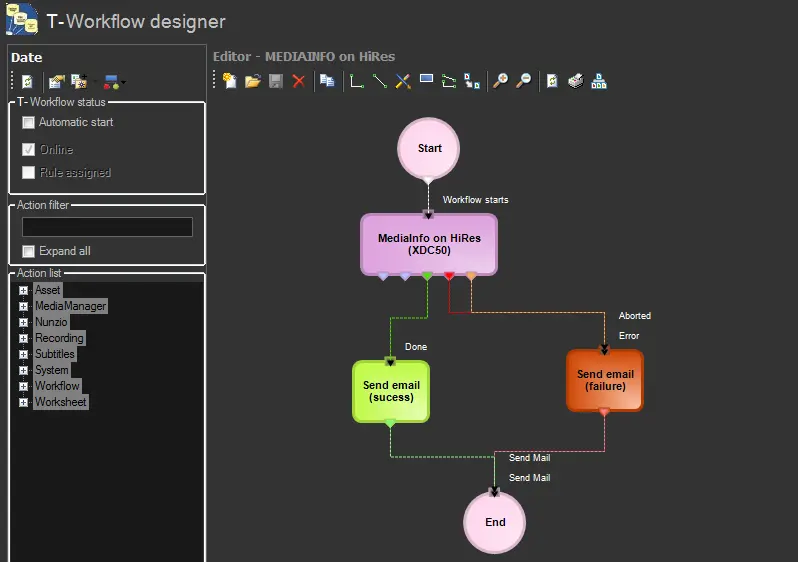
2. Include the just created action within a T-workflow from the Designer section:
T-workflow 1
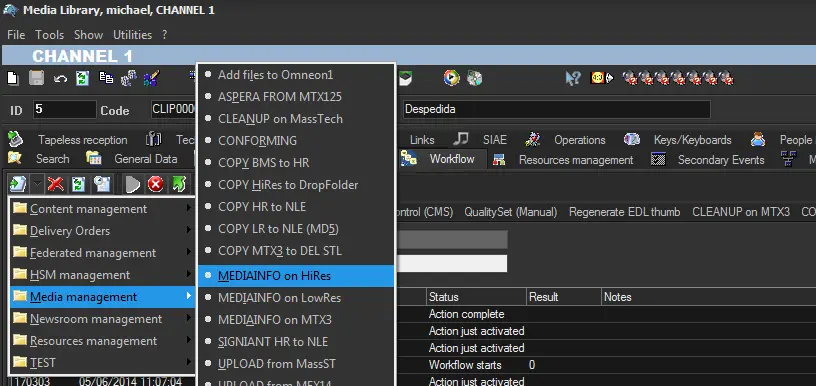
3. Open the Media Library and launch the T-workflow containing the action for a certain asset:
Media management
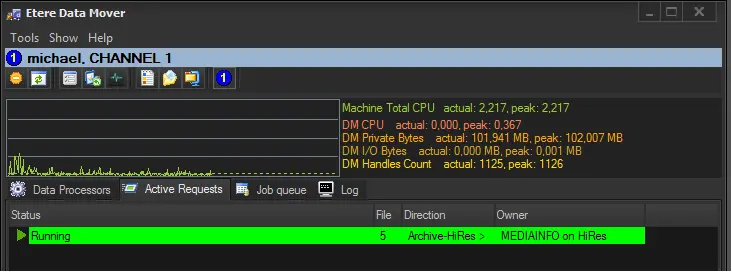
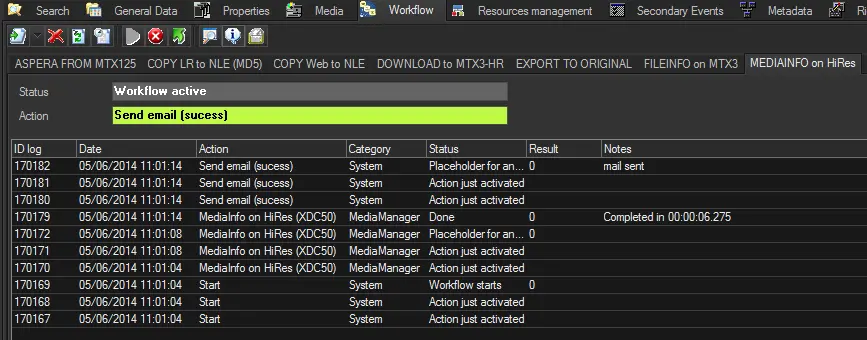
4. DataMover will automatically process the request, retrieving MediaInfo data:
MediaInfo data
MediaInfo data 2
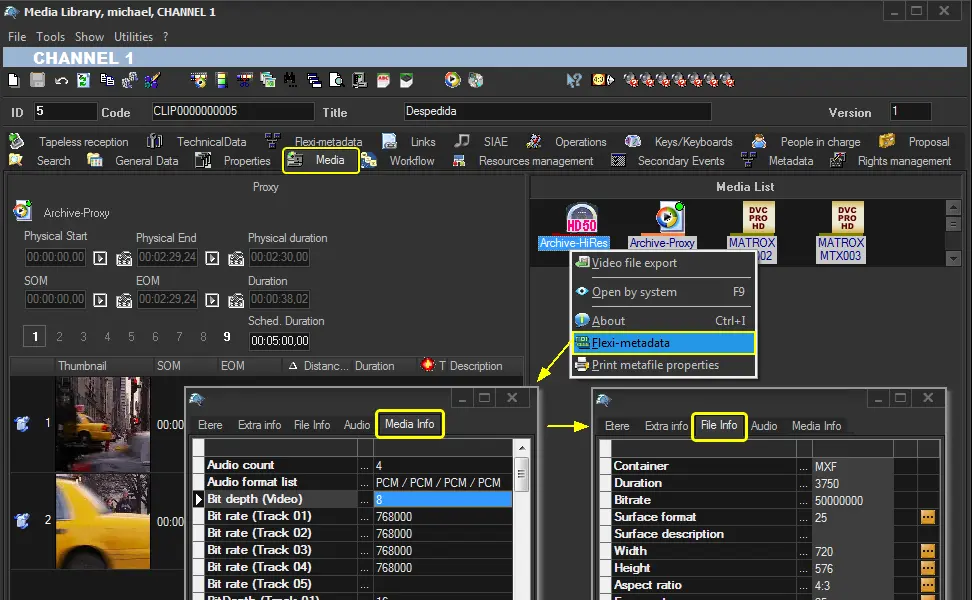
5. All gathered information will be saved in the metafile's MediaInfo metadata and also in the FileInfo metadata (if conversion is enabled):
FileInfo metadata
Note: Depending on which parameters were enabled in the MediaInfo action, the following operations will be performed:
▪Convert MediaInfo data into Etere FileInfo Standard: Store gathered information in the FileInfo metadata
▪Update codec information: Compare FileInfo metadata against the codec mapping to determine the codec of the metafile.
▪Update asset data: Use FileInfo metadata to update asset fields (e.g. duration).
Reported Problem
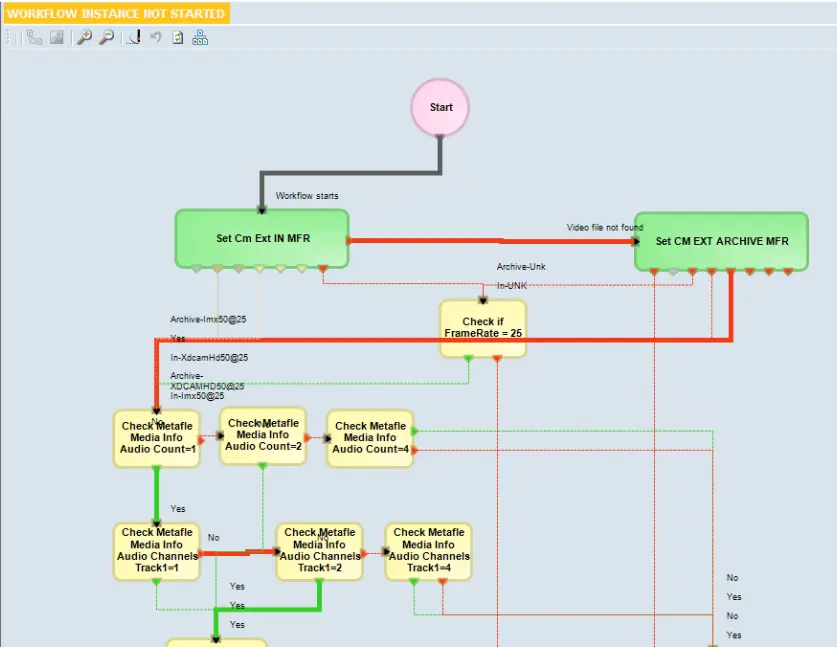
For import IMX files, MediaInfo read the number of channels correctly but read the audio stream count as 1. This impacts the T-workflow that depends on several audios for import, even if they are valued correctly in the IMX file.
The Mediainfo task has been enhanced to import the IMX file into a metadata file. In addition, the audio and channel processed by MediaInfo are reflected in the T-workflow.
workflow_actions_dm_medisinfo
 Media_management
 FileInfo_metadata
 MediaInfo_data
 T-workflow_1
 ce_copy_mediainfo
 MediaInfo_data_2
 workflow_actions_dm_medisinfo