60.3.1 Configuration settings
Installation
Etere Disaster Recovery can be installed, along with Etere Scheduling or Etere Automation, on any PC's local drive; this computer must be granted access to read and modify the schedules placed in the On-Air and Disaster Recovery automation servers. If Etere Disaster Recovery (DR) is activated on the PC, only one instance of DR can be active at a time.
Configuration
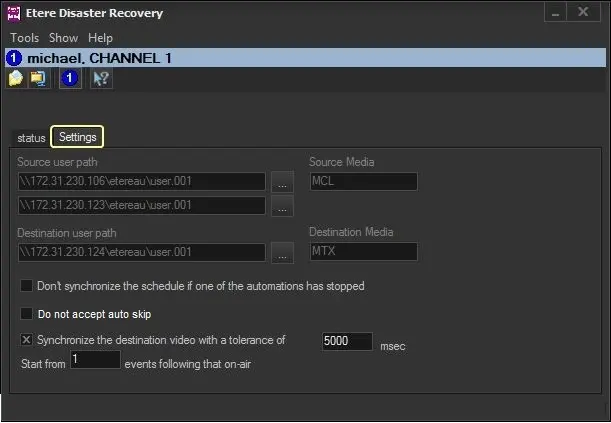
To set up Etere Disaster Recovery, you must first set some relevant parameters present in the Settings tab; these parameters are:
Etere Disaster Recovery
Parameter - Source Path and Media
Description: Specify the information that will permit the Disaster Recovery to keep the source and destination automations aligned:
•Source user path: Enter the UNC path to the publishing folder (e.g. \\my-server\etereau\user.001) on which playlists (i.e. TPALxxyy.dbf) are stored.
The Disaster Recovery will copy source playlists into the destination path.
•Source media: If blank, the disaster recovery automation would use the media type related to the device specified in the source schedule (e.g. MTX). Playlists would be copied if set, and the source media type (e.g. MTX) would be replaced with the destination media type (e.g. MCL).
Media types related to specific devices can be consulted in the Resource Viewer.
NB: If the playout system includes clone automation, it will be possible to specify its publishing path in the second box so that Etere Disaster Recovery can control both.
Parameter - Destination Path and Media
Description: Set the disaster recovery automation's publishing path and media type.
Parameter - Do not Synchronize the schedule if one of the automation has stopped
Description: If enabled, the synchronization would be performed ONLY if both the "On-Air" and "Disaster Recovery" automations are running.
Parameter - Do not accept auto skip
Description: Enabling this option would ignore the "Skip" commands triggered by Automation (Main and Clone). Only manual "Skip" commands issued by the operator would be managed. By default, this option is disabled.
Parameter - Synchronize the destination video with a tolerance of
Description: If enabled, the synchronization will ignore scheduling gaps lower than the specified time (five seconds by default), and if the gap is higher, Etere Disaster Recovery will remove this difference.
Parameter - Start from "events following that on-air
Description: Specify the number of events to start from after the on-air event.
NB: From Etere released version 29.1 onwards, the "Skip automatically the manual events" option has been removed, and the "Skip" command will be generated during the synchronization of playlists from Main Automation to Backup Automation.
 disrec_settings_new