84.4.4.27 STANDARD > IMAGINE > BINARY
Export Scope
The Imagine Binary export function creates a file in binary format (.LST) containing the broadcast schedule for each selected day, allowing to choose between exporting the real schedules or one of the 10 alternative schedules managed by Etere.
Export Parameters
In order to use this export function, it is required to compile the following parameters:
Export_standard_louth_binary
Export tab
•Period: Indicate the interval of days to be exported, one file will be created for each day within the period.
•Alternative schedules: Here it will be possible to change the schedule to be exported, which by default is the real schedule, this by selecting one of the 10 alternative schedule managed by Etere.
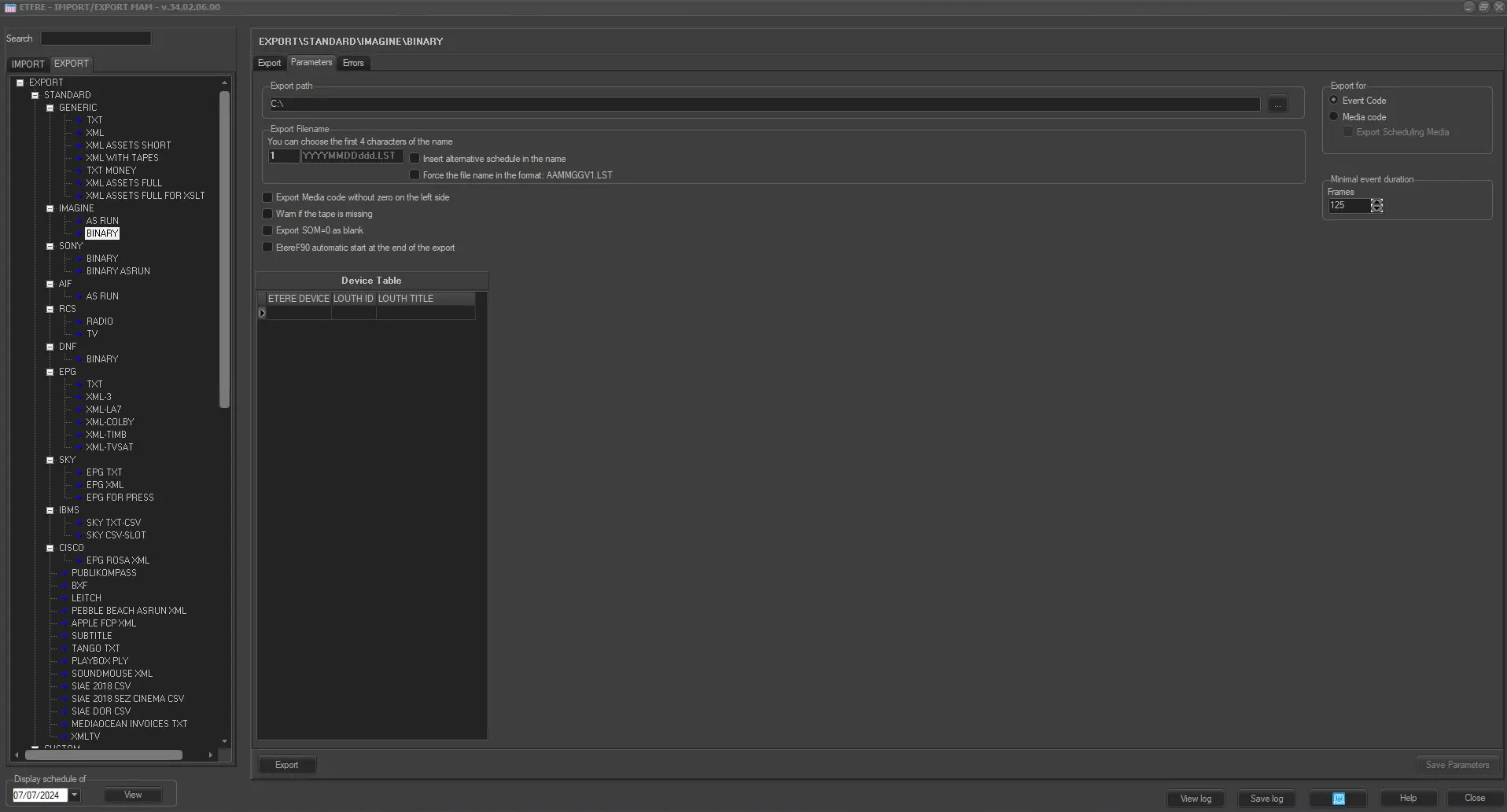
Export_standard_louth_binary parameters
Parameters tab
•Export path: In the parameters section, the export path needs to be specified.
•Export filename: Here it is possible to insert up to 4 numbers (e.g. the station reference) to be appended at the start of the exported filename, the rest of the filename will be made up of the date (i.e. yyyymmdd) and day (i.e. yyyymmdd) in question (e.g. 1234yyyymmdd.LST).
❑Insert alternative schedule in the filename: In case an alternative schedule is exported, the filename will contain -as a suffix- the number related to the exported alternative schedule.
❑Force the file name in the format: AAMMGGV1.LST: Alternatively, enable this option to export the file with filename format as “AAMMGGV1.LST” where,
AA = Year
MM = Month
GG = Day
V1 = Written as default
❑Export for: It allows to define which code will be exported to detail the asset to which an event is related, available types are:
oEvent code: It will be exported the code with which the event has been scheduled.
oMedia code : It will be exported the code of the media file linked to the event. It is suggested, in order to avoid ambiguity, to have events with just one linked media.
❑Export Media code without zero on the left side: Allows you to export a code that exists as 0000213 to 213 for example.
❑Warn if the tape is missing: A warning message will be given if an asset code has no tape linked to it.
❑Export SOM=0 as blank: If the SOM is zero no value is assigned to the SOM in the created file.
❑Etere F90 automatic start at the end of the export: Etere F90 will automatically start as soon as the file has finished being exported.
•Minimal Event Duration: It is possible to define a minimum events duration, in such a way that if in the exported schedule there is an event shorter than the minimum duration, a record with a 'Short Duration' label will be created.
•Device Table: It allows to define the link between Etere devices and the Imagine ones, in particular the GPI and Audio devices. For example:
- To export an Etere GPI (e.g. GPI1) with a Imagine ID of 'RAIUNO' and a Title of 'GPI Commercial' insert:
Etere Device - GPI1
Imagine ID : Channel3
Imagine title : GPI Commercial
- To export Etere Audio types (i.e. A-Dolby, A-Dual, A-Mono and A-Stereo) inserting them in CAPS in the Etere Device column, while the corresponding descriptions that you want to export are inserted in the Imagine ID and Imagine Title columns.
Etere Device - A-DOLBY
Channel3
Imagine ID : Music tracks
Imagine title : Errors tab
The errors tab will detail to the operator all issues encountered during the exporting process.
Launch the export
Once the export has been configured, it can be started just by pressing the <Export> button.
 EXPORT_IMAGINE_BINARY
 EXPORT_IMAGINE_BINARY_PARAMETERS