59.4.7.14 Packaging
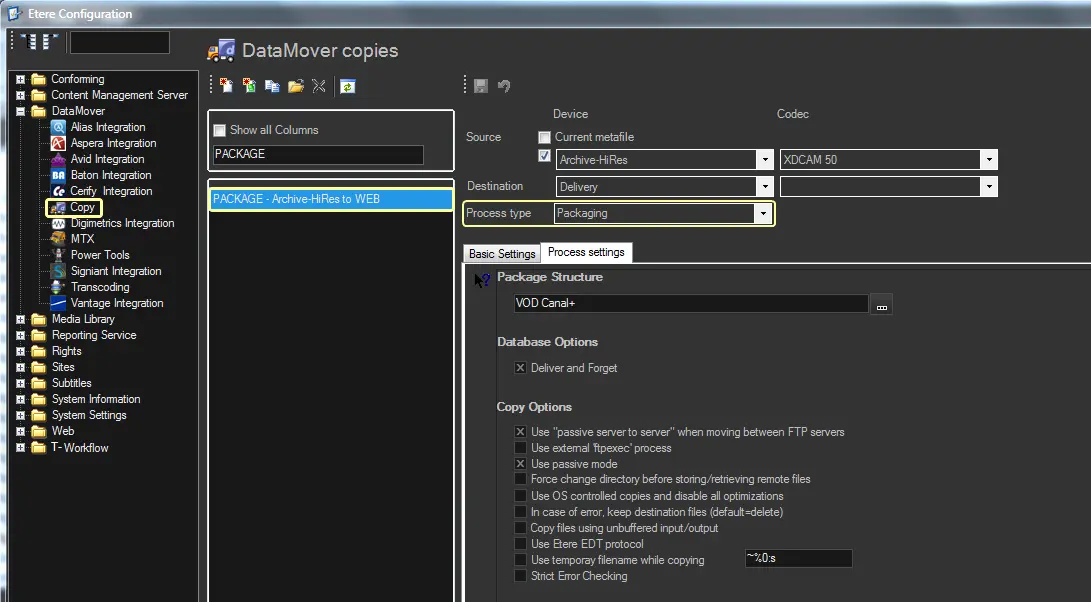
The "Packaging" action type allows exporting multiple files linked to an asset as one single package (either as a directory or a zipped file).
This action is particularly useful for exporting bundle assets (i.e. assets holding multiple files such as hires video, audio tracks, proxies, documents, etc.) and project files (i.e. metafiles composed of various files for their original directories and names that have been preserved).
To create a new action, the following parameters need to be set:
Creating_a_new_action
Package structure
Set the behaviour regarding the structure of files within the package.
Press the button to open the Package Editor and configure the structure of the package that will be exported.
Refer to Package Editor chapter for further information.
Device and Codec
Please refer to the Copy Action chapter for device and codec settings.
Please note that with Packaging action, the files would be copied to the FIRST path set in the meta device in the Destination field and renamed according to the rules specified in Package Editor. It is not possible to set a specific path as a destination unless a new metadevice is configured.
Database options
Set the behaviour regarding the storage of files in the database:
Deliver and forget: If enabled, files will be copied to the target location without referencing them in the Etere database.
NB: Upon copy, all files in the main folder and sub-folders would be deleted from the system except all the empty sub-folders; you would need to launch a deletion batch program or add the batch program to schedule a task to delete all sub-folders within the specified path.
Copy options
Set the behaviour regarding the copy of files in the destination:
Use "passive server to server" when moving between FTP servers: Enable this option if both source and destination devices use the FTP protocol and support 'passive mode'.
Use external ftpexec process: If checked, Data Mover will not perform the copy, but it will launch an external application (ftpexec.exe) with the proper parameters to perform the copy via FTP.
NB: Enabling this feature will improve, depending on the used devices (e.g., K2, PDR), the overall performance and safety of the transfer process.
Use passive mode: If checked, the FTP client will try to use passive mode for all file transfers (upload/download/move); otherwise (if disabled), the standard active way will be used.
Force change directory before storing/retrieving remote files: If enabled, the download/upload of files will be performed using the "CWD [path] + STOR / RETR [filename]" command instead of the "STOR/RETR [path/filename]" command (as by default).
Use OS controlled copies and disable all optimisations: If checked, using a plain OS Api will be forced for Download / Upload functions (just like a DOS console copy), thus avoiding hard-drive buffering and file system fragmentations that may cause corrupted files.
In case of error, keep destination files (default=delete): If enabled, partially transferred files (its default action) won't be deleted even if an error occurs.
Copy files using unbuffered input/output: If enabled, copy operations will be performed using unbuffered I/O, bypassing system I/O cache resources. Instead, thus improving very large file transfers (as Microsoft recommends) and CIFS-based Media Library transfers (as SeaChange suggests).
Otherwise, (if disabled by default), copy operations will use buffered I/O, thus improving the overall physical memory usage for small file transfers.
NB: This option (based on the windows COPY_FILE_NO_BUFFERING flag) is valid only for Microsoft Windows Vista and newer (i.e., Windows 7).
Use Etere EDT protocol: If enabled, Etere Data Mover will use the EDT protocol (see the Etere Data Transfer protocol chapter) to perform media transfers; the use of this protocol is suggested in case of transferring large files between servers spread over a high-latency WAN (e.g., located in different geographical places).
NB: Please note that the use of EDT is compatible with the help of ftpexec and the use of separate agents, but it is not consistent with the use of the passive server to server (the use of EDT will be ignored) nor the use of passive mode (the use of EDT will be preferred).
Use a temporary filename while copying: If checked, Etere Data Mover will use a temporary filename while copying, renaming the file with the last name at the end of the copy. E.g. ~%0:s
Strict error checking: If disabled, errors will be returned only when the Windows API communicates that a copy failed. Keep this option disabled to prevent receiving fake errors (e.g. overlaps) on "UNC to UNC" copies.
If enabled, errors will be returned when either Etere or the Windows API arise an error code.
NB: This option is disabled by default for actions created with Etere 24.2 or higher; instead, for those created with lower versions, it's automatically set as disabled (unless a user manually changes it).
 Creating_a_new_action