59.2.2.10 Schedule
The parameters in regards to the behaviour of commercial schedules (e.g. Strategic Editor):
schedulingrules_schedule
CHECKING RULES
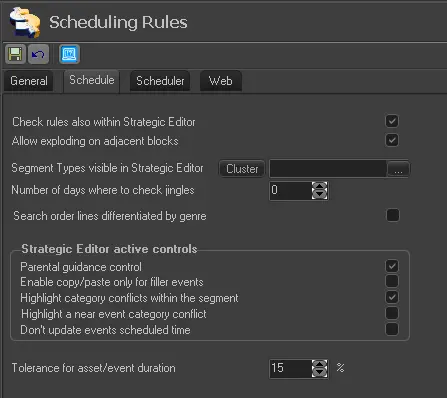
Check rules also within Strategic Editor - If activated, all the commercial rules mentioned are controlled not only in the reservation phase, it includes manual scheduling from within Strategic Editor.
Enabled (default)
Allow exploding on adjacent blocks - If enabled, it allowed to explode the event outside its initial block. For instance, if an event has more parts (e.g. 5) than segments available in its initial block (e.g. 2), it would be exploded across all the following blocks in order to fulfill the remaining parts (e.g. 3).
(if disabled, the explosion would be limited to the initial block, exploding only those parts which fits that block.
NB: Please note that in both cases, only those segments with the same event type will be considered for explosion.
Enabled (default)
Segment types visible in Strategic Editor - This parameter allows you to specify which segment types are visualized in the schedule in Strategic Editor. By default when the schedule opens, all segments are visible.
None (default)
Number of days for the control of jingles - Indicate the number of days which the presence of jingles must be controlled.
0 (default)
Search order lines differentiated by genre - If enabled, the "Search events" tool of Strategic Editor will display order lines according to the genres of their linked assets, order lines will be split into many entries as genres in their assets.
In general, this feature allows inserting order lines specifying (based on its genre) the exact asset to be broadcasted.
Disabled (default)
ACTIVE CONTROLS
Parental guidance control - If enabled, the 'parental guidance control' will be performed in both phases, during the events scheduling and the assets assignment.
Enabled (default)
Enable copy/paste only for filler events - Use it to restrict the copy/paste function in Strategic Editor only for fillers. Please note that cut/paste will be possible since it doesn't alter the number of appearances (i.e. runs) defined in the order lines.
Disabled (default)
Highlight a near event category conflict - If enabled, events scheduled near (i.e. before or next to) to another event with the same product category will be highlighted (with an icon) in the Strategic Editor schedule for easy recognition.
Enabled (default)
Highlight category conflicts within the segment - If enabled, events with the same product category scheduled within the same segment will be highlighted (with an icon) in the Strategic Editor schedule for easy recognition.
Disabled (default)
Don't update events scheduled time - Enable this control to update the scheduled time of the events involved in the operations remain as it initial scheduled. It's suggested to enable this parameter to keep scheduled times of commercial events which are not grouped within clusters.
Disabled (default)
Tolerance for asset/event duration - Set the maximum difference that should be allowed between the duration of a contractual event and its associated asset. If the difference exceeds the specified value, a warning will be displayed during the material assignment.
15% (default)
 schedulingrules_schedule