59.2.18 Media Pools
What is a Media Pool?
A Media Pool is a collection of tapes containing common properties (e.g. same program type, same related application, same backup policies, etc.); thus enabling stations to gain access to specific tapes in a library, archive specific program types, store video logged programs, and create backups of the system database. Media Pools can be freely defined, allowing stations to create media pools and organise them according to their specific needs.
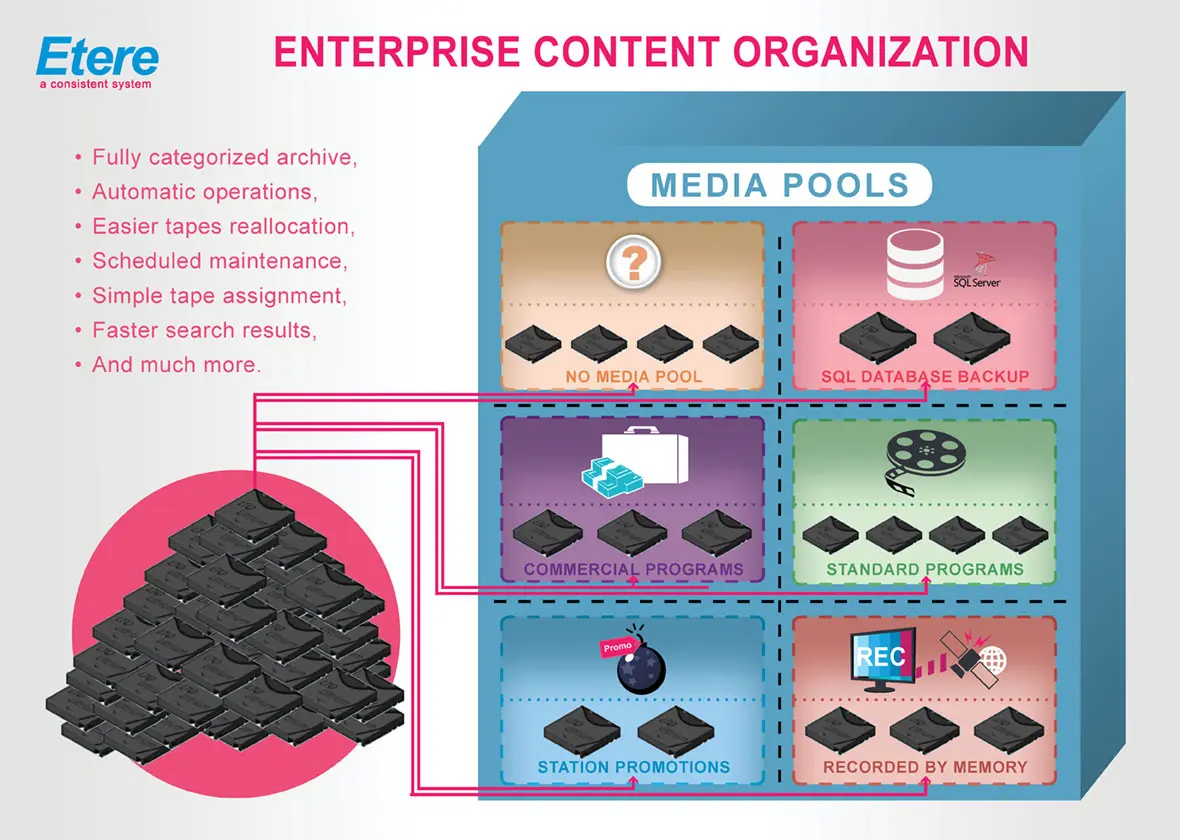
Enterprise_content_organization
Media Pools are a key element of Hierarchical Storage Management (HSM) as they act as a "virtual location" for the system to organise contents. Media Pools are crucial for implementing a well-organized content archive, providing a fully categorised archival system for automatic archive/restore operations, easier tapes reallocation, scheduled maintenance tasks, simple assignment of tapes, and faster search and retrieval of tape content.
1. Configuring Media Pools
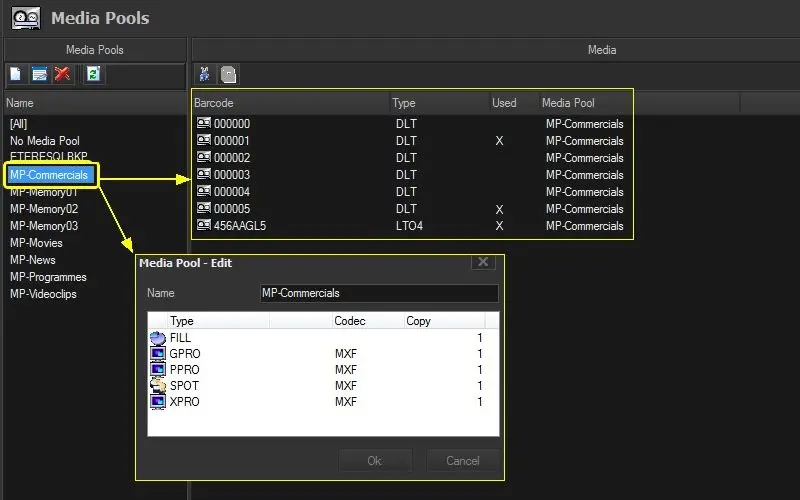
The Media Pools section is only available in case an HSM Library is correctly configured in the system (under Etere Configuration | Configuration Editor); in case it is enabled, its interface will look like the following figure:
Configuring_Media_Pools
•Media Pools
This list is contained all the media pools created by the user as well as the two system media pools (which can be neither deleted nor modified); these items are:
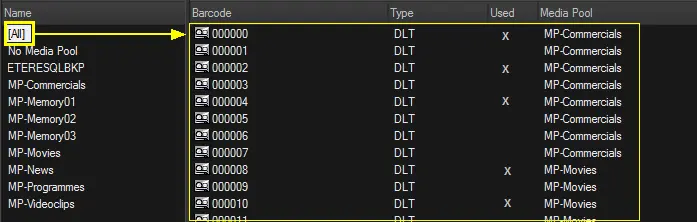
ALL - Here is provided with an overview of all tapes available and the media pools that are using them:
all_tapes_available_and_the_media_pools
NO MEDIA POOL - This system media pool comprises all tapes that don't form part of a media pool, that is, which are not yet categorised:
NO_MEDIA_POOL
ETERESQLBKP - This system media pool contains all tapes used to store the backups of Etere's database. This media pool is configured from this section but from the Etere HSM | Tools | Database backup module:
ETERESQLBKP
Make double-click on a certain media pool or select "Edit" option, to view the asset types currently associated with it (see figure above).
•Media List
This list contains all the tapes specified to store the data assigned to their group. Only data tapes (e.g., LTO4, DLT, etc.) can be categorised in media pools. To be displayed here, they must have been properly detected by Etere HSM (they must appear in the media section of Etere Headquarters).
Associating tapes to media pools is possible by "drag & drop" or "cut & paste" tapes into proper media pools. For instance, assigning the "00045" tape to the "Videoclips" media pool is enough to drag and drop it to the media pool in question.
Note
Moving -empty or partially used- tapes between media pools is allowed only if the following requirements are satisfied:
•The tape doesn't have queued operations on HSM (e.g. there's a pending archiving operation requested).
•The tape doesn't have files that conflict with the ones in the destination media pool (e.g. there's a file with the same name, codec and metadevice).
2. Assigning Media Pools
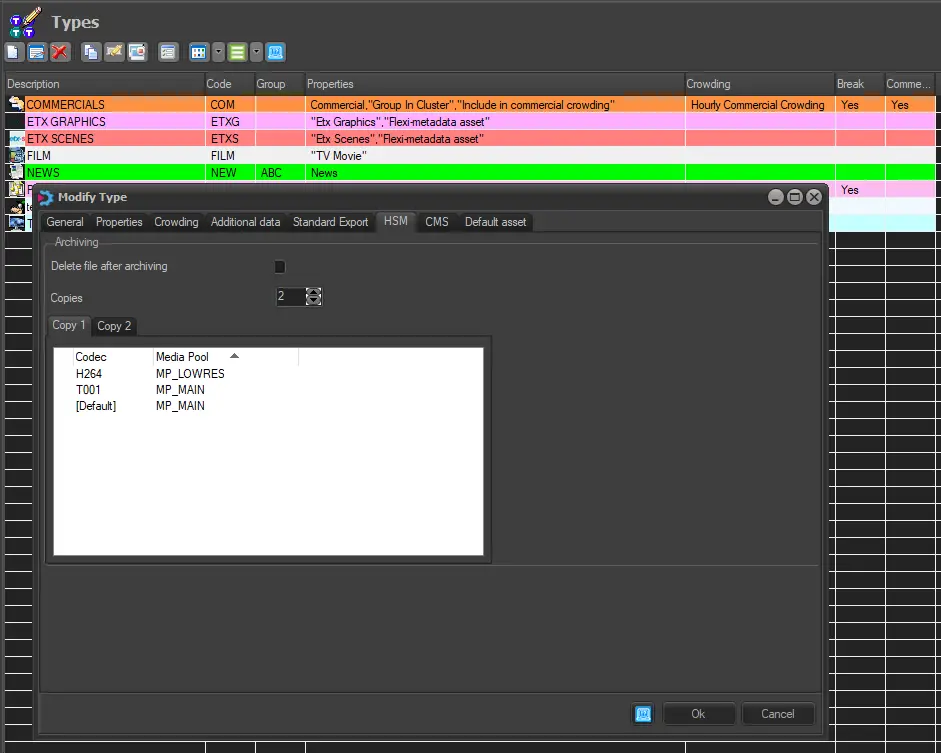
Media Pools are associated with specific asset types under the Etere Configuration | Settings | Types Editor | HSM section; there; it will be possible to select the number of archiving copies to be performed as well as the related media pools to be used for storing them:
Assigning_Media_Pools
Suggestion:
To perform a redundant archiving of your contents, it's suggested to create two different copies (e.g. copy1 and copy2) containing two different media pools (e.g. MP_Spots_Main and MP_Spots_Backup) for the same codec (e.g. MPG), this configuration will make HSM to archive two copies of the same content into two different locations, thus increasing the redundancy and reliability of the archiving process.
3. Using Media Pools
Once all previous configurations have been performed, each time Etere HSM starts scheduling operations, it will also schedule the archive of media pools into a related group of tapes.
Please note that each time you modify the Media Pools configuration (e.g., add or remove tapes), it is required to launch the 'Realignment of the content of media pools' task from Etere HSM; this task will check all archived contents, migrating them from one tape (initially assigned) to another (recently assigned) to respect the new Media Pools configuration.
 Enterprise_content_organization
 Configuring_Media_Pools
 all_tapes_available_and_the_media_pools
 NO_MEDIA_POOL
 ETERESQLBKP
 Assigning_Media_Pools