Media Library
9.2.3 New Asset
Click<New Asset>in Media Library to launch the dialogue box.
New_Asset
To create a new asset, enter the asset information in the parameters:
- Type: Select the type of asset from the drop-down list, e.g. News story, commercial, file, ETX graphic, etc.;
- Code: Set the unique asset code for the new asset;
Note: You can assign up to 32 characters for the asset code. If the asset Code is set to exceed the limitation, only the first 32 characters of the asset code will be saved.
- Title: Enter a title to the new asset created;
Note: The maximum number of characters allowed is 200. If the asset title is set to exceed the limitation, only the first 200 characters of the asset title will be saved.
The selected asset type would be mapped to Flexi-metadata in Media Library and set the asset type for the new asset.
Click<Create>to confirm the asset creation.
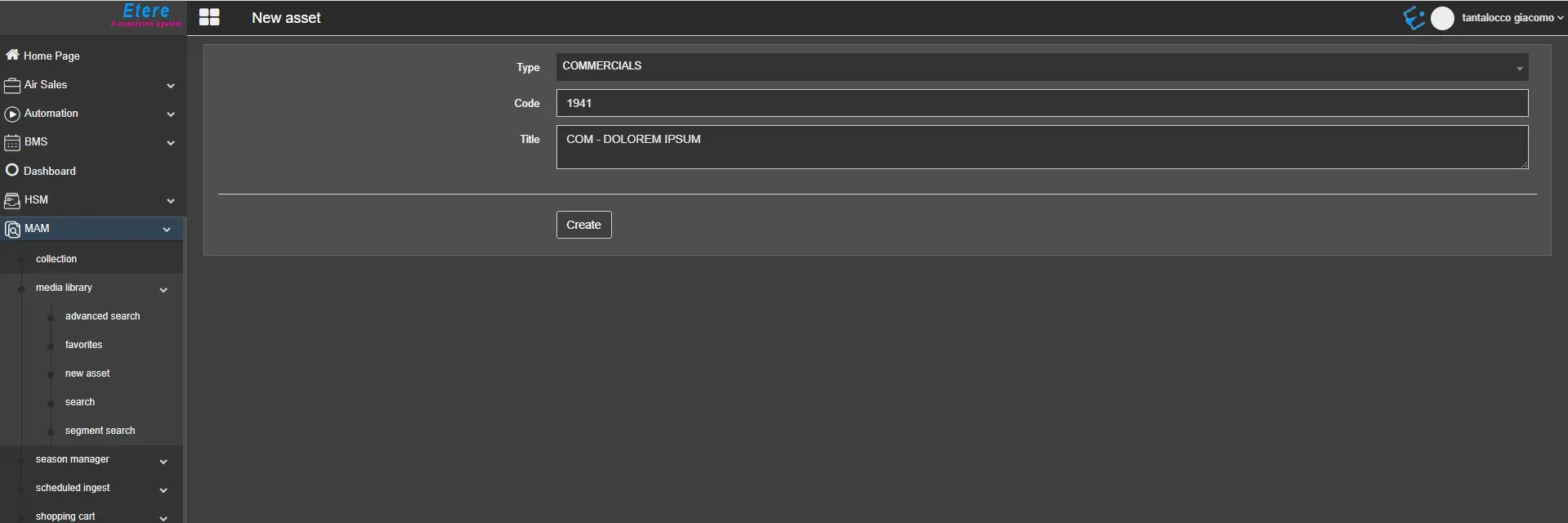 new_asset