84.12.10 Displaying Logos on a Proxy Preview
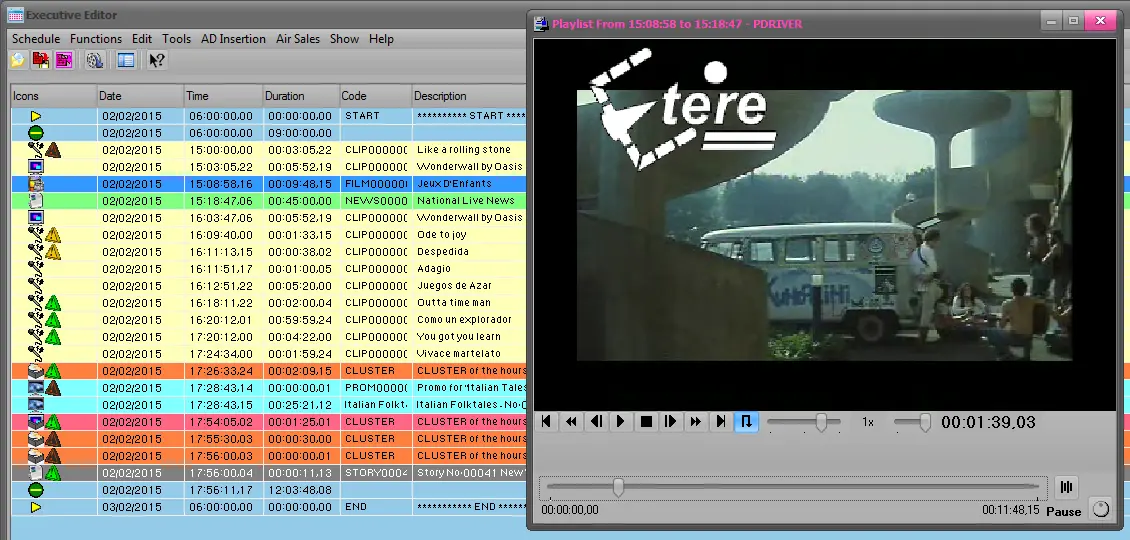
You can preview a proxy video file from Executive Editor, you will be able to view one or several stations' logos overlapped to the asset's video file.
In Executive Editor, after you've selected just one or several events in order to have a proxy file preview, select from the right-click menu Preview > Proxy file with logo:
Embim103
Start the partial preview - If enabled, specify the period of time at which the logo will be displayed (at start and end).
If disabled, the logo is played for the entire duration of the event.
Audio channel - Select the audio channel to be played.
After pressing [Ok], the event will be previewed along with their related logos:
Preview_logo
NB: Information regarding how to create and assign a Logo is found in the Creating a suitable BMP Logo chapter.
 5403_Embim103
 5402_Preview_logo