74.4.2.2 Etere MAM
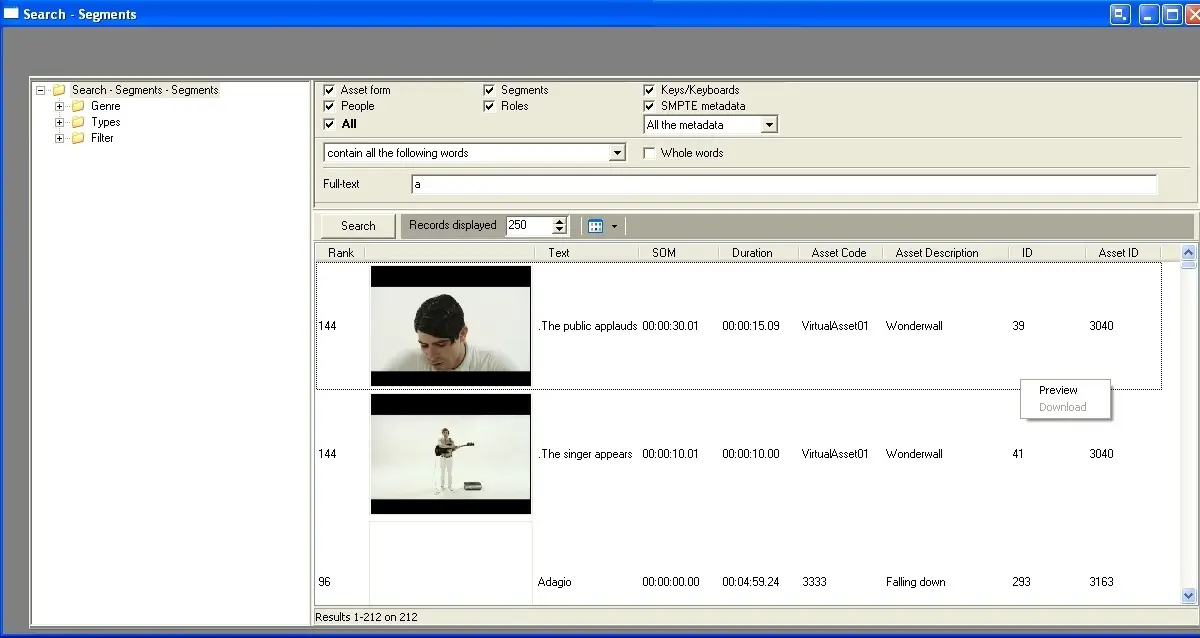
With this function you are able to search all the segments indexed by Etere MAM, it is possible to search keywords across several asset fields including asset form, people, segments, roles, keys, SMPTE metadata, etc. To search for a segment just compile the search criteria and press the 'search' button:
Mosgate_eteremam_new
Once the search has been performed by clicking on the 'search' button it will be possible to:
•On the left-hand side, all the retrieved segments are grouped by genre and type, additionally, the production date and recording date filters allow to perform a more accurate search,
•On the right-hand side, segment properties (artist name, roles assigned, SOM and EOM, Insert on the playlist) are displayed, being also possible to preview and download (if available) the low-res video of the segment,
•By selecting video segment(s) and making double-click on them, they will be inserted in the playlist (i.e.: on the Rundown); and in case the asset(s) are archived, and in ENPS parameters the option 'restore archived files' is enabled, the restore request will be forwarded to Etere Media Manager to restore them via T-workflow.
NB: The 'Full-Text search' must be enabled in Etere's SQL database in order to search keywords across all asset fields.
 Mosgate_eteremam_new