84.4.4.22 STANDARD > IBMS > SKY CSV-SLOT
Export Scope
The Export Standard IBMS SKY CSV-SLOT export all scheduled events within the specific date range, with the exception of settable event types. The export file name is “Asset code-From date (YYMMDD)-To date (YYMMDD).csv”, e.g. “1234-200607-200608.csv”.
During export, there are 7 columns to be exported:
•First column: Asset is export as TX or SLOT, where SLOT indicate program
•Second column: The issuer code is exported (e.g. H63_)
•Third column: The date format is exported as “DDMMYYYY”
•Forth column: The SLOT column contain the program. If the program divided into parts, only the first program is indicated.
•Fifth column: The time format is exported as “HH:MM:SS”.
•Sixth column: Contain the description of the program. It includes the asset CODE in the program description, and without double quotes on program title.
•Seventh column: The duration is exported in “HH:MM:SS” format.
The program to be exported are determine by the asset type set in the export.
Export Parameters
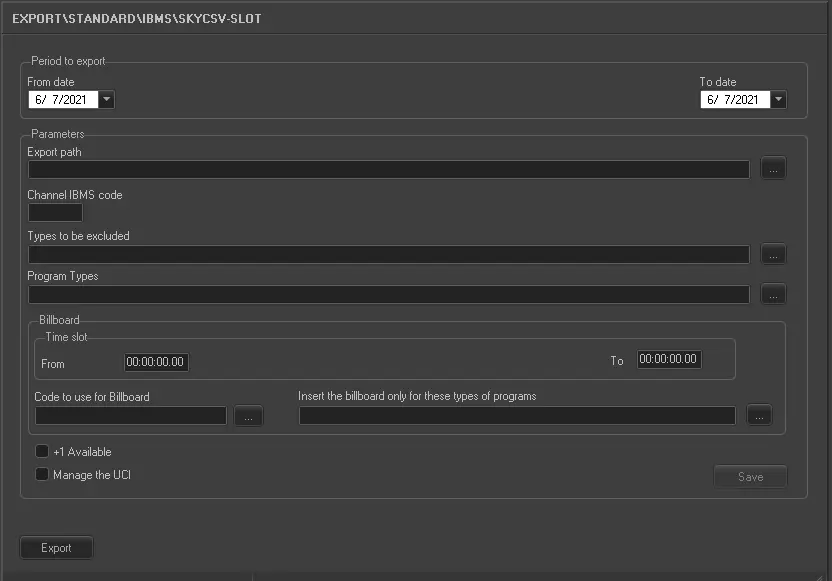
This procedure is divided in two main fields:
Export_standard_ibms_sky_csv_slot
•Period to export
Select the interval of days (from date - to date), from where the schedules would be exported.
•Parameters
oExport path: Specify the path where the exported file would be saved.
oChannel IBMS code: Insert the code assigned to the station. Code's maximum length is four characters.
oTypes to be excluded: Specify the asset types to be excluded from the export.
oProgram types: Specify the program types to be exported.
•Billboard
oSpecify the time slot (from date – to date) to export the billboard events
oCode to be use for Billboard: Indicate the code to be used for Billboard events.
oInsert the billboard only for these types of programs: Indicate the program types to be inserted as Billboard events.
❑+1 Available: Enable this option to include addition event.
❑Manage the UCI: If this option is enabled, the UCI data containing a 9-digits publisher information (see below) would be exported to the last column in the CSV file. The UCI data would be used to insert subsequent advertisements and billboards during Import of SKY CSV. Upon export, the UCI data would be uploaded to event ID field in Asset Playlist table (Tpalinse.externalid).
The 9-digits UCI data consists of:
- 2 digits: the user + 10
- 2 digits: the month
- 2 digits: the day
- 3 digits: (the progressive day * 2) + 10
e.g. “111225102” refer to first event (111225102) on Christmas day (111225102) from broadcaster 1 (111225102).
When all parameters are fulfilled, click the <Save> button to save the settings.
Launch the export
Once all parameters have been correctly set, just press the <Export> button to launch the export operation.
 5087_Export_standard_ibms_sky_csv_slot