59.2.6.2 Presentation Editor
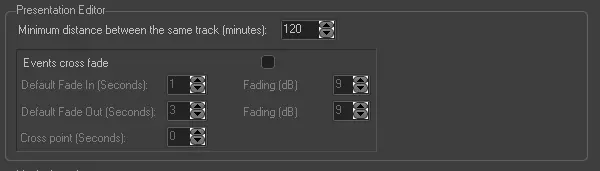
The "Presentation Editor" area allows setting some parameters related to the broadcast of events scheduled through the Presentation Editor module. Available options are:
Presentation_Editor
•Minimum distance between the same track (minutes)
Indicate the minimum time gap (in minutes) before allowing to schedule the same track from the Presentation Editor module.
•Events crossfade
Enable/disable here the crossfade between tracks. If enabled, it will be possible to set the following parameters:
•Default fade in Set the duration (in seconds) of the fade-in and the fading-up audio level (in decibels). For example, set here to fade-in the track beginning at 9.0 dB over 1 second.
•Default fade out: Set the duration (in seconds) of the fade-out and the fading-down audio level (in decibels) to be applied. For example, set fade-out the track ending at 9.0 dB over 3 seconds.
•Crosspoint: Indicate the exact point (seconds after the track ends) when the next track will be overlapped.
 Presentation_Editor