72.7.3.1 Getting subtitles into the database
Etere allows adding subtitles in different ways, as explained in the following lines they can be either imported or produced by operators.
Import subtitles
Import from the Media Library
1.Launch the Media Library module and open the asset for which you intend to assign the subtitle(s),
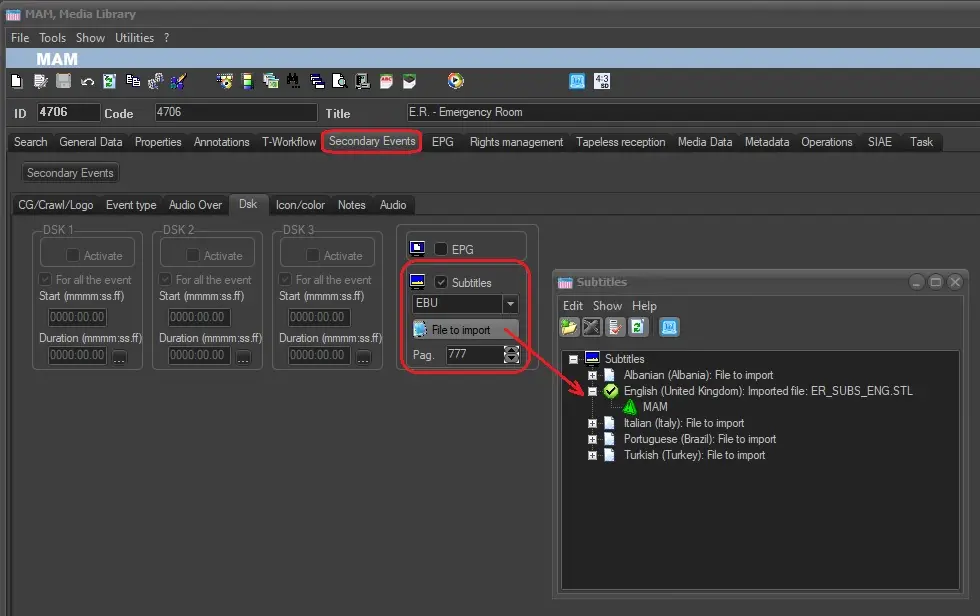
2.Go to the Sec. Events > DSK tab and set the following information:
Subtitles - Tick off the subtitles flag to indicate that the current asset is subtitled.
Type - Select the subtitle format of the file to be imported. In case of using a ETX choose "Etere".
Page - Indicate the CTM script (e.g. 777) to be used for sending the subtitles to Etere STMan.
NB: The 3 parameters above can be also automatically set by the workflow action "Set subtitle flag and page number".
[File to import] - Press this button to open the window for selecting the language and files to be imported.
3.When the new window is opened, choose a language among the list of enabled languages, then click on the [Import file] button. The system will allow to automatically or manually select the file to be imported.
Media Library
4.Imported subtitles will be stored in the database and will be included in the asset's media list.
NB: When importing subtitles file, the import check the timecode in the file, the total number of blocks present and the language code that must be coincide with the main language parameter for the default page, which is page 777.
Also, if the flag is enabled but no subtitle file has been imported yet, Executive Editor will show a warning in the schedule.
 Media_Library