84.4.5.73 CUSTOM > ORBIT DB
Import Scope
The import custom ORBIT DB import an XML file containing schedules and assets old palettes and asset cards into Etere database. The import would update the metadata if asset exist in database, else the import would create new assets in database.
If assets exist in database, the following updates would be performed:
- Update episode numbers to database, even the episode numbers are same as the parent asset
- The duration of the parent asset is updated with the total sum of child assets
Import Parameter
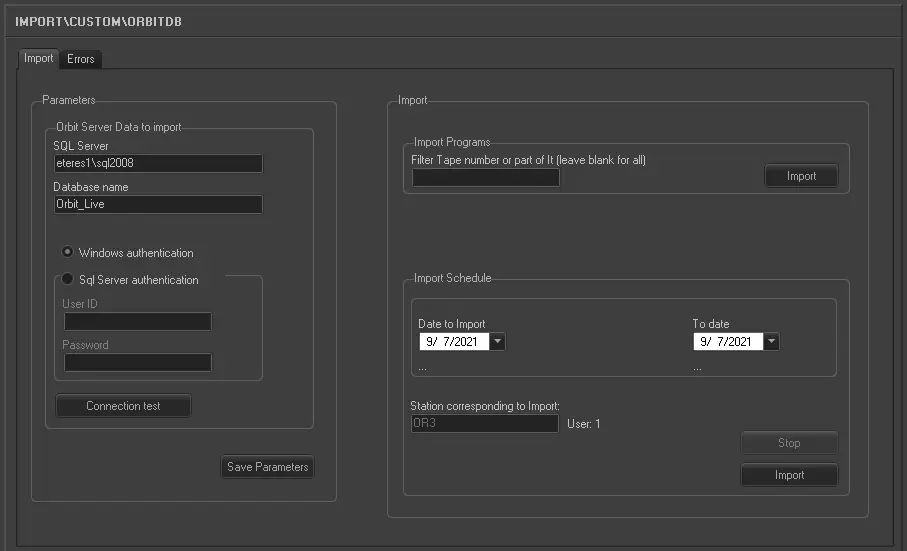
Import_custom_orbit_db
Orbit Server Data to import:
•SQL Server: Specify the SQL Server name.
•Database Name: Specify the name of the database to be import to in the SQL Server.
oWindows authentication: Select this option if the importation would be authenticated by Windows user ID and access rights created in Windows Active Directory.
oSQL Server authentication: Select this option to authenticate the import based on the user ID created in SQL Server. You are required to provide the user ID and password for authentication.
•Use the “Connection test” feature to establish the connection to the SQL Server.
Use the <Save Parameters> button to save the parameters entered above.
Import Programs:
• Filter Tape number or part of it (leave blank for all): Enter the correct tape number to link assets with asset number greater than 1 in the program schedule.
Import Schedule:
•Date to import: select a date from the calendar as the start date to import the scheduled asset.
•To date: select a date from the calendar as the end date to import the scheduled asset.
•Station corresponding to import: Specify the issuer's name where the importation would be triggered.
The import feature is enable to manage schedules prior to 2004, the schedule name would be mapped accordingly to following table:
'OR3' -> 'AC'
'OR2' -> 'AB'
'OB1' -> 'AA'
'OB4' -> 'AD'
'SER' -> 'SC'
•Automatic Transform Tpalinse into VirtualAssets: With this option enabled, the import would automatically connect to SQL database and transform asset playlists in TPALINSE into virtual assets.
oThe asset are inserted directly into schedule as if they had exploded from virtual assets
oIf the virtual asset is not present, it would be created
oThe transformation into virtual assets would take place at the end of the import day.
oWhen all assets are imported, the assets would contains value “INF_DIGIT=0”
•Transform Tpalinse into virtual assets: Activating this feature would connect to SQL database and transform asset playlists in TPALINSE into virtual assets.
Launch the Import
When all parameters had been fulfilled, click the <Import> button to start the import process.
 5286_Import_custom_orbit_db