54.5.3.2 Delete
The Delete function allows you to delete any event from the schedule, from one or several days and from all or only specific time ranges, according to the various modes. To start deleting an event, search for it using the [Event Code] button and then compile the following parameters:
Tralit_eventschedule_deletions
Parameter - From - to (dates)
Description: Insert the dates range in which the asset will be deleted. By default, the order's start & end dates will be proposed.
Parameter - From - to (times)
Description: Optionally, specify the period the asset will be deleted. By default, the order's start & end times will be proposed.
Parameter - Delete mode
Description: Indicate the method to be used for removing the asset:
Event - Delete a specific occurrence. If you don't remember the code to delete, select the button to make the relative list appear, from which you can search.
All events - Delete the entire schedule of the selected period; all scheduled events matching the given criteria will be deleted.
Event types - Delete all the events of a particular type (seasons, films, shows, etc).
Event duration - Delete from the schedule all the events with a duration between the specified range.
Seasons - Delete all the events relative to a specific customer.
Parameter - Code
Description: Depending on the "delete mode", select the event (e.g. 3063), type (e.g. shows), seasons (e.g. peanuts 2nd season), or duration (e.g. within 00:00:01 and 00:00:20) to be deleted.
Once all parameters have been set, press the [RUN] button to proceed with deleting the scheduled events, asking you before deleting to confirm the deletion.
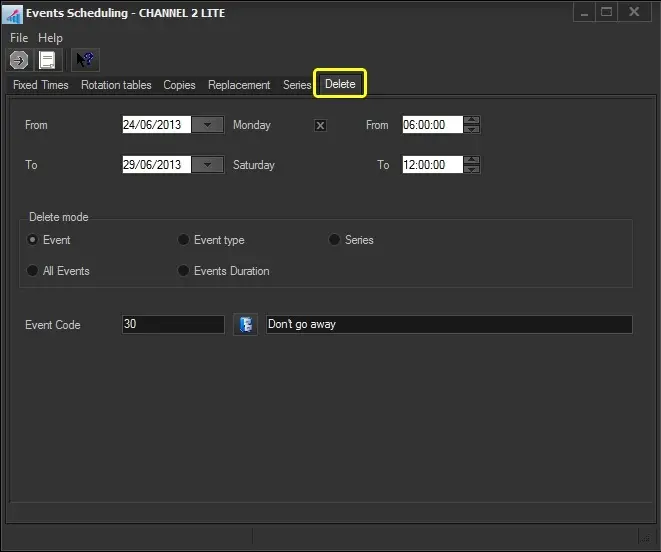 Tralit_eventschedule_deletions