59.7.1.3 Etere router IP resource
The Etere Router IP resource is a video router allowing all Etere modules to manage the configured NDI signals of IN/OUT.
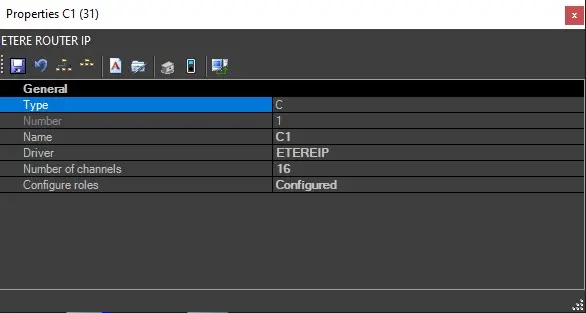
To add the router, launch the Configuration module and select Resource Editor, click the down arrow key beside the <Add> button to list the available resources and select "Video routers". From the list of device types, select "Etere Router IP" to launch the properties page and enter the following information:
router_ip_properties
- Name: Give a name to the new resource
- Driver: "ETEREIP"
- Number of channels: Specify the total number of channels
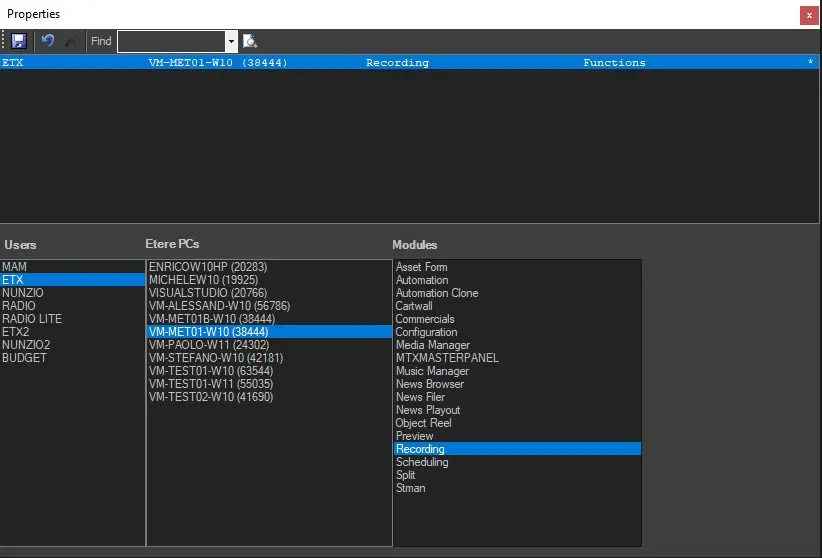
- Configure roles: You can assign a configuration role to the new router. Click on the icon on the extreme right to open the Properties window. From the lower panel, select the stations, the etere PCs, and the module you want to assign the Etere router IP to, then click the Save button to confirm the role assignment.
In the example in the image below, we allowed INGEST, which runs in VM-MET01-W10 PC, to manage the router switch for the recordings performed with station ETX.
roles_router_example
The newly configured role will appear in the top panel, as shown in the above screenshot. You can assign multiple roles to the video router. To delete any configured role, simply highlight the role in the top pane and click the Delete button (X). Moreover, by clicking on the selected role in the top pane and selecting "Function Properties", you can modify the properties of the selected role.
Upon completion, close the Properties dialogue window to save the configuration.
Important Note: Only one Etere IP Router resource is allowed in the resource list; if you attempt to add another similar resource, the following error message will be prompted.
unable_to_add
 router_ip_properties
 roles_router_example
 unable_to_add