69.1.2.14 ORBIT EPG
Export Scope
The F90 export custom ORBIT EPG XML export to a XML file containing one day schedule for the playout system.
Export Parameters
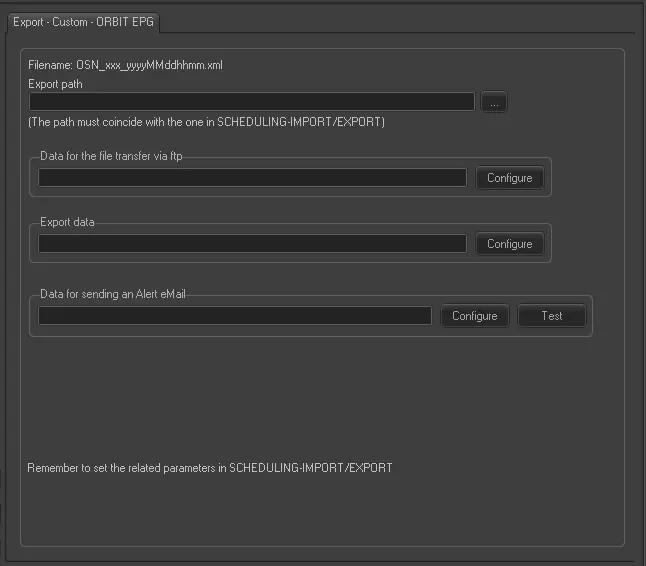
Export - Custom - ORBIT EPG
Filename - Indicate the file name of the exported xml file is "OSN_xxx_yyyymmddhhmm.xml”. 'OSN' is a fixed string, 'xxx' is the 3 characters channel ID specified in Import/Export parameters.
Export Path - Specify the path where the exported xml file would be placed. Use the browse button to locate the path.
Data for the file transfer via FTP - Click on the Configure button and define the FTP parameters as described in Configure Data File Transfer via FTP chapter.
Export data - Opens the Configure Export window to specify the days and the frequency to be exported.
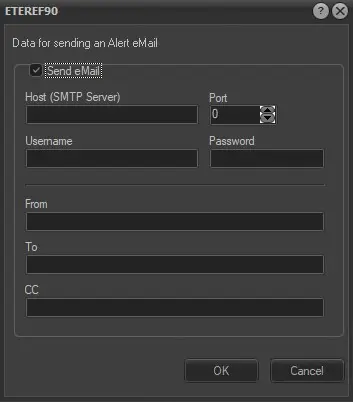
Data for sending an alert email - Enable the “Send email” option and configure the following parameters:
alert_email
Host (SMTP server), Port: The dedicated SMTP server and its port number.
Username and password: User login name and password.
From: Sender's email address.
To: Recipient's email address.
CC: Recipient's email address in the CC list.
Once configured, use the <Test> button to send a dummy email to verify the parameters.
Schedule Related Export
Set the same parameters in the Etere Scheduling > Import/Export > EXPORT\CUSTOM\ORBIT\EPGXML and <APPLY> the changes once done.
 Export_-_Custom_-__ORBIT_EPG
 alert_email