59.6.2.424 Using the Script Editor if Comstream DAC is installed in the Etere system
In case a ComStream DAC audio codec/multiplexer is installed in the Etere system, an alternate version of the Script Editor will be displayed to allow the management of script strings (Etere Configuration >>> Devices >> Script Strings).
The alternate Script Editor has been specifically implemented to store the COM Stream commands to be executed by the device in Etere's database; these scripts are associated with asset forms indicating if they will be performed at the asset's start or end.
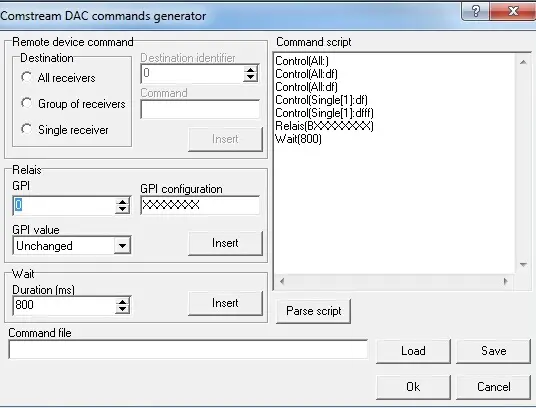
To create a new script, compile the following parameters:
com_stream_dac_script_editor
•Command script: It's the command script, precisely as it will be sent and executed.
•Remote device command: Indicate if the command will be executed on all receivers, a group of receivers or a single receiver. Indicate also the destination ID as well as the command to be executed. Press the [Insert] button to add this parameter to the command script.
•Relais: Indicate the GPI to use to force the COMM as well as the configuration to be sent.
•Wait: Indicate the command waiting time (in milliseconds),
•Command line: Use the [Load] button to browse and select a file containing the command script to be used; once done, press the [Save] button to insert it into the command script.
•[Parse script]: This button converts the parameters displayed in the command script into an understandable command.
Once all parameters have been correctly set, press the [OK] button, and the script (and all its parameters) will be saved into the database.
 com_stream_dac_script_editor