84.4.4.13 STANDARD > EPG > XML-TIMB
Export Scope
The EPG - TIMB option, allows the user to export the daily list of scheduled programs, thus, by creating a file in XML format (with a .XML extension) containing the schedule for a maximum of seven days.
Please note that the <name> tag is retrieved from the "Configuration > Settings > Types", either from a type (filmati.newtype) or a "standard export" property.
Export Parameters
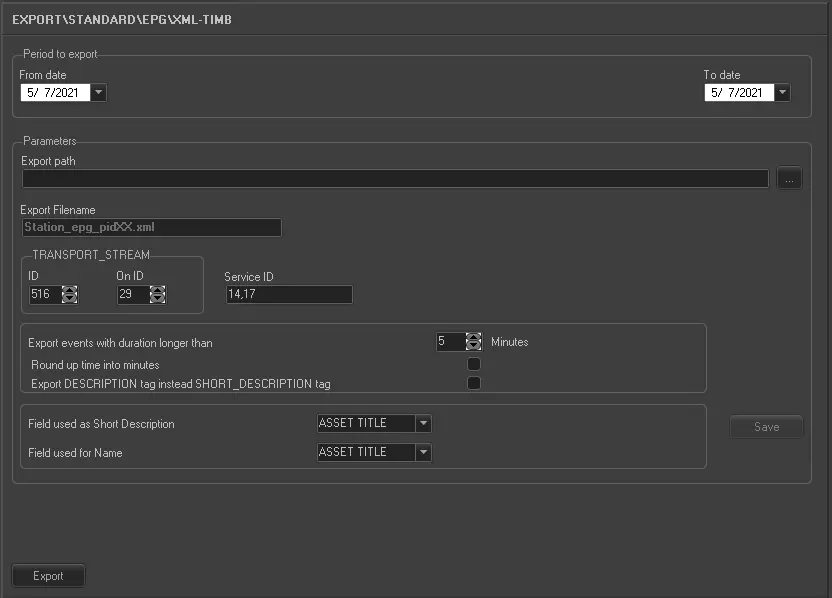
This export module requires the following parameters to be set in order to be correctly used:
5073_Export_standard_epg_xml_timb
•Period to export (from date - to date): Indicate the date range on which the schedules to be exported are contained,
•Export path: Indicate the path to the directory on which the exported files will be stored once generated,
•Transport Stream: Indicate in the ID and On ID parameters the 'MUX ID' and the 'DTT Provider ID' respectively,
•Service ID: Indicate the number of the service ID. In case of various services, indicates their codes separating them with a comma (,).
•Export filename: Exported files will be named according to the following format: station_epg_pidXX.xml, where station is replaced with the station name and XX with the Service ID for which the export has been performed,
•Export events with a duration longer than: This parameter permits to export only those events which duration is longer than the value specified here, ignoring events with shorter durations.
•Round up time into minutes: Enable this option to round up the time between programs in order for the programs to run consecutively without break.
•Export the DESCRIPTION tag instead of SHORT_DESCRIPTION: If enabled, instead of export the 'SHORT_DESCRIPTION” field which has a limitation of 250 characters for event name and description, the “DESCRIPTION” tab field would be exported.
•Field used as Short Description/Name: It simply allows to select the assets table field to be used for the short description or name of scheduled events. Possible fields are:
- ASSET TITLE : it will use the field FILMATI.DESCRIZIO from the Etere's database.
- STORY : it will use the field FILMATI.TRAMA from the Etere's database.
- EPG1 : it will use the field FILMATI.DESCRIZIO_1 from the Etere's database.
- EPG2 : it will use the field FILMATI.DESCRIZIO_2 from the Etere's database.
Launch the export
Once the export has been configured, it can be started just by pressing the <Export> button, a file will be created for each Service ID.
Sample file to import
The exported file using this method will have to the following structure:
<?XML VERSION="1.0" ENCODING="ISO-8859-1" STANDALONE="NO"?>
<PSI XMLNS:FO="HTTP://WWW.W3.ORG/1999/XSL/FORMAT">
<TRANSPORT_STREAM ID="516" ON_ID="29">
<SERVICE ID="14">
<EVENT CA="FALSE" DURATION="PT30M" TIME="2010-04-23T07:00:00">
<NAME LANG="ITA">NEWS</NAME>
<SHORT_DESCRIPTION LANG="ITA">LE NOTIZIE DEL GIORNO UNA FINESTRA SULL'ATTUALITA' E LA CRONACA.</SHORT_DESCRIPTION>
</EVENT>
<EVENT CA="FALSE" DURATION="PT1H15M" TIME="2010-04-30T05:45:00">
<NAME LANG="ITA">NEWS</NAME>
<SHORT_DESCRIPTION LANG="ITA">LE NOTIZIE DEL GIORNO UNA FINESTRA SULL'ATTUALITA' E LA CRONACA.</EVENT>
</SERVICE>
</TRANSPORT_STREAM>
</PSI>
 5073_Export_standard_epg_xml_timb