54.8.2.5 Other Data
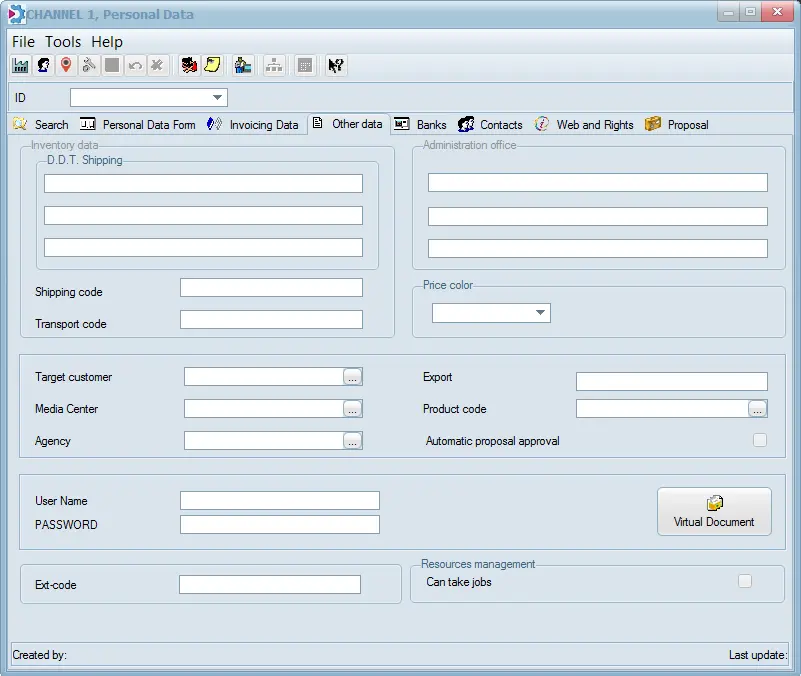
The Other Data tab allows administrators to define a username and password to authenticate access to EtereWeb services (if available on your system); for EtereWeb, there is also another tab named 'Web rights' where the administrator can define the permissions:
Configuration_personal_data_other_data
Accountancy data
Inventory data - Specify the shipping address for transportation documents (DDT Shipping) and the Shipping and Transport codes.
Administration Office - Address to be used for invoicing if different from the previous one.
Price colour (CL) - Select the price list classification to be used by default for the current user on sales proposals and orders.
Relationships
Target customer - Target customer to which the current person/company is related.
Media Center - Media centre to which the current person/company is related.
Agency - The agency to which the current person/company is related.
Export - Reference field exported through the TXT Money export to detail, for example, the system to which data will be exported.
Product code - The category to which the product related to the contact belongs (e.g. alcoholic drinks). This information automatically proposes a product code each time a new proposal/order is created for the current customer contact.
Automatic proposal approval - Enable this flag to approve all proposals related to this customer automatically. Proposals will be auto-approved even if the "auto-approval" is disabled (see Sales > Parameters).
This parameter is useful to approve proposals from a particular agency directly, thus making them "approved" as soon as they are "sent to evaluate" (see Sales > Manage a proposal).
Access
User Name & Password - Specify the access credentials to be used by the current company/person to access Etere's web applications (e.g. EtereWeb, Web Services, etc). Please note that both fields must be correctly compiled to be saved and updated.
Virtual Document - Associate various documents to the person or company in question. This could be scanned invoices, contracts etc.
Ext-code - Specify the assigned customer's external code. It is useful during asset searches where the customer ID is unavailable for filtering. The "Ext-code" would display in search results.
Worksheets
Can take jobs - This flag determines if the contact is allowed or disallowed to receive assigned tasks derived from worksheet actions. Please note that, by default, this parameter is enabled only for Etere users.
At the bottom of the display the creator of the Personal Data form is displayed at the bottom left corner. The bottom right corner indicates the last modified date and time of the personal data information and the user who changed it.
Air_sales_personal_data_creator
NB: Validity time and other password-related properties can be set in the Configuration > Settings > Passwords section.
 Configuration_personal_data_other_data
 Air_sales_personal_data_creator