69.2.1.20 XML ASSETS FULL
Import Scope
The F90 - XML Assets Full import allows to import assets from external sites contained into XML files stored in a certain path. This function is the core of the Federate Management capabilities of Etere.
It's worth mentioning that before the import certain conditions are checked and actions are taken after the import:
Before import:
The path from which to import assets is retrieved from the "import path" set in the Sites configurations.
If an asset already exists in the local site, Etere would import it only if the date on the filename is more recent than the date stored in the "last import from site" metadata.
After import:
The "Last import from site" SMPTE metadata of imported assets will be set with the current date and time (in UTC GMT+0).
The file is moved (i.e. archived) to the path specified in the import parameters.
It would be verified that all imported assets with a valid external ID (i.e. greater than 0) exist in the reconciliation file (etere.asset.SiteID_totals.txt) created during the export (it contains all assets in the source site).
Assets missing in the reconciliation file wouldd be removed from the target site to keep the target site reconciled with the source site.
Once imported, Media Library will contain all assets information on their properties (e.g. title, duration, etc), origin (external ID and site) and operations log (import operator, computer, date, etc). Moreover, it's worth mentioning that remote sites related to imported assets are automatically inserted in the List of sites.
Imported fields:
Detailed information on the fields managed by the XML Asset Full function can be found in the Supported asset fields chapter.
Import Parameters
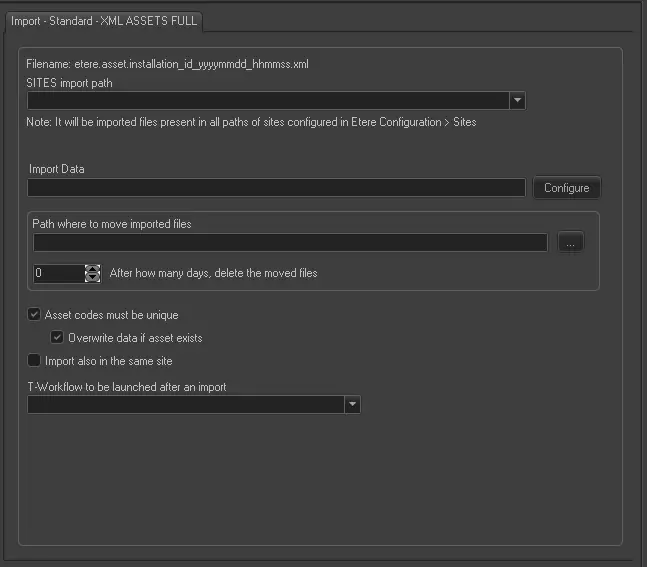
Import - Standard - XML ASSETS FULL
Filename - Data of imported assets would be get from single XML files matching the following name format:
Etere.Asset.[SiteID]_[AssetID]_[yyyymmdd]_[hhmmss].xml
[SiteID] - ID of the source site (e.g. 701)
[AssetID] - ID of the exported asset (e.g. 12345)
[yyyymmdd] - Date the asset was exported (e.g. 20130831)
[hhmmss] - Time the asset was exported (e.g. 102245)
NB: The date (yyyymmdd) and time (hhmmss) of exported files is always in UTC format (GMT+0).
SITES import path - It displays all the paths in all installation sites which are available for import. Select an appropriate path among the sites to start the import. If a path is used by another user, the path cannot be selected for import.
If an import path is not indicated, the import would not be started.
Import data - Opens the Configure Import window to specify the days and the frequency to be imported.
Path where to move imported files - In this parameter, indicate the path to store the previously imported files before the next import take place. When moving imported files to the configured path, if any file contain no data (file size=0) a pause of 500 msec (0.5 second) would be imposed, after which, an error message would be logged in the “Error” tab for investigation before proceed to import the XML file.
After how many days, delete the moved files - Set a retention period to keep the previously imported XML files in the path indicated in “Path where to move imported files”. If this option is enabled with a value set greater than 0, imported files with retention date beyond the set value would be deleted.
Asset code must be unique - If disabled, assets with already existing codes would be imported anyway. Otherwise, these assets won't be imported but it would be possible to enable the "overwrite data if asset exists" option to update the data of existing assets with the data of imported assets.
Import also in the same site - While searching for appropriate path among all sites, enable this option to look for available path also in the same site.
T-workflow to be launched after an import - Indicate the T-workflow to be triggered when the import is completed successfully.
NB: If problems are encountered during the import process, it is possible to consult the "Errors" tab.
Scheduling related import
The "Federated Search" automatic import function of Etere F90 is based on the manual function of Etere Scheduling: XML Assets Full standard import.
 Import_-_Standard_-_XML_ASSETS_FULL