84.2.4.17 SCTE Splicing
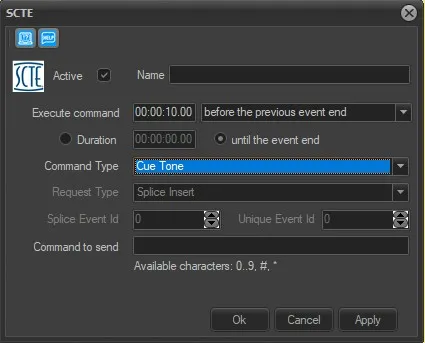
In order to transmit SCTE splice command, using STMan's plugin "SCTE Cue Tone", to the selected secondary event scheduled in the playlist, the following parameters need to be configured:
SCTE_splice
Active: Enable this option to activate the secondary event.
Name: Assign a name to the secondary event.
Execute command: Indicate the Start Time of the command and specify at which point the command would take place. Possible values are:
➢ After the event start: execute the command when the amount of time specified is passed, after the start time of the current main event (E.g.: If the main event starts at 15:00:00.00 and the time set here is 00:00:30.00, the command will be executed at 15:00:30.00).
➢ Before the event end: execute the command when remains the amount of time specified, before the end of the current main event (E.g.: If the main event ends at 15:00:00.00 and the time set here is 00:00:30.00, the command will be executed at 14:59:30.00).
➢ Before the previous event end: execute the command when remains the amount of time specified, before the end of the previous main event (E.g.: If the previous main event ends at 15:00:00.00 and the time set here is 00:00:30.00, the command will be executed at 14:59:30.00).
➢ After the previous event start: execute the command when the amount of time specified is passed, after the start time of the previous event (E.g.: If the previous main event starts at 15:00:00.00 and the time set here is 00:00:30.00, the command will be executed at 15:00:30.00).
Duration: If the duration of the break is set, the secondary event indicates a break start, while a duration equal to 0 indicates a break end.
Command Type: Select the command type Etere between:
>Cue Tone: sends a cue tone
>Break Marking: sends a break start or break end command
in case of a Break Marking selection, the user will be able to choose the Request Type sent within the SCTE secondary event:
Time Signal: An SCTE time request is a signal within the SCTE-35 protocol that specifies the timing for inserting or transitioning content within a broadcast stream, such as triggering a commercial break or switching segments.
Splice Insert: An SCTE splice request is part of an automated system used to signal when to splice (cut) a broadcast to insert or remove content, typically commercials or program segments.
NOTE: For the splice insert type it is mandatory to set also the splice event ID and the Unique event ID.
>Provider Placement Opportunity: sends a PPO start or PPO end command
>Splice Insert: specific command for splice inserts, as for the Break Marking in the case splice insert is selected as request, it is mandatory to set splice event ID and Unique event ID.
Click <Apply> and <Ok> to confirm the transmission of SCTE cue tone.
 SCTE_insert