93.2.1.23 MMS - Avid Integration
The Etere Avid Integration allows managing files stored in Avid systems, enabling users to archive or restore them automatically through a T-workflow-based operation.
Note: The "Avid Integration" section is available only if the station has a valid license.
Here are the parameters to configure the action:
avid_settings
AVID TAB
Url (mandatory): URL on which the Avid Interplay Web Services is available: http://[AvidInterplayServer]:[Port]/services
For instance: http://172.31.230.136/services
User name (mandatory if required by ws): Login username for accessing the Avid Interplay web service.
Password (mandatory if required by ws): Login password to authenticate the web service's username.
Avid Interplay Workgroup (mandatory if required by ws): Specify the Avid Workgroup where files reside. Note: The workgroup name is case sensitive.
Url check: It's possible to check if the specified url can be contacted successfully.
Operation (mandatory if required by ws): Indicate if the action to be performed is either:
Archive - Pull files from Avid into a cloud-device.
Restore - Push files from a cloud device into Avid.
Upload - Push files from a cloud device into Avid.
Delete - Delete assets and files from Avid.
Depending on the success of the operation, the action will return one of the following results:
IDLE - The web service was connected, and files were found, but the operation was not yet started.
RUNNING - The web service was connected, files were found, and the operation is in progress.
DONE - The web service was connected, files were found, and the operation was completed.
ERROR - The web server was not connected, and files were not found.
ABORTED - The web server was connected, but the operation was cancelled.
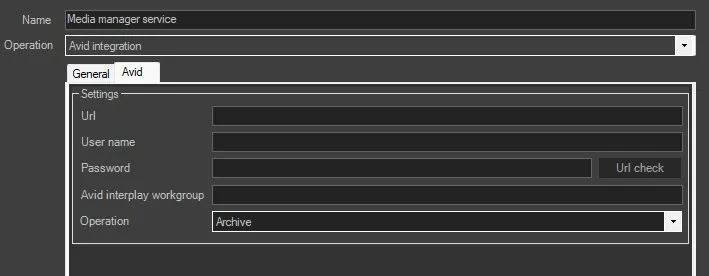 avid_settings