92.2.2.1 Switching Modes
The EA1791 device is able to switch the control of all the devices from a Main to a Backup equipment, this switch can be performed either manually (by pressing a button) or automatically (via GPI). The diagram below illustrates how EA1791 Redundancy Switch manages all connections:
EA_791_Redundancy_Switch
When the EA1791 device is started, each channel data connector (i.e. GPI to Device and Serial to Device) is preset to connect to the connector A (i.e. GPI in/out A and Serial in A), and the proper led is turned on. After which, switching can take place in four different ways:
1.Manually: By pressing the front switch button lines A and B (main/clone) are inverted.
2.GPI Mode-A: This mode uses the Remote Control port, each time the pins 7 and 8 are short-circuited the lines A/B are inverted, it is equivalent to pressing the 'manual switch button'. For further information regarding configuration of pins, please consult the Wiring > Pinout > Remote Control chapter.
3.GPI Mode-B: This mode uses the pins 1 and 2 of the Remote Control port. It forces either the line A (opening contacts) or line B (closing contacts). For further information regarding configuration of pins, please consult the Wiring > Pinout > Remote Control chapter.
4.GPI-to-Device: This mode uses the GPI nº0 of the GPI to device connector, this switch works exactly same as GPI Mode-B, by opening the contact the device is set to the Line A, and by closing it the device is set to the Line B. For further information regarding configuration of pins, please consult the Wiring > Pinout > GPI to Device chapter.
Note: This is an unusual switching mode, only used in particular cases.
NB: Whichever switch mode is used, if you then press the manual button or pins 7 and 8 are short-circuited on remote control, the device changes its status (i.e.: lines A and B came switched).
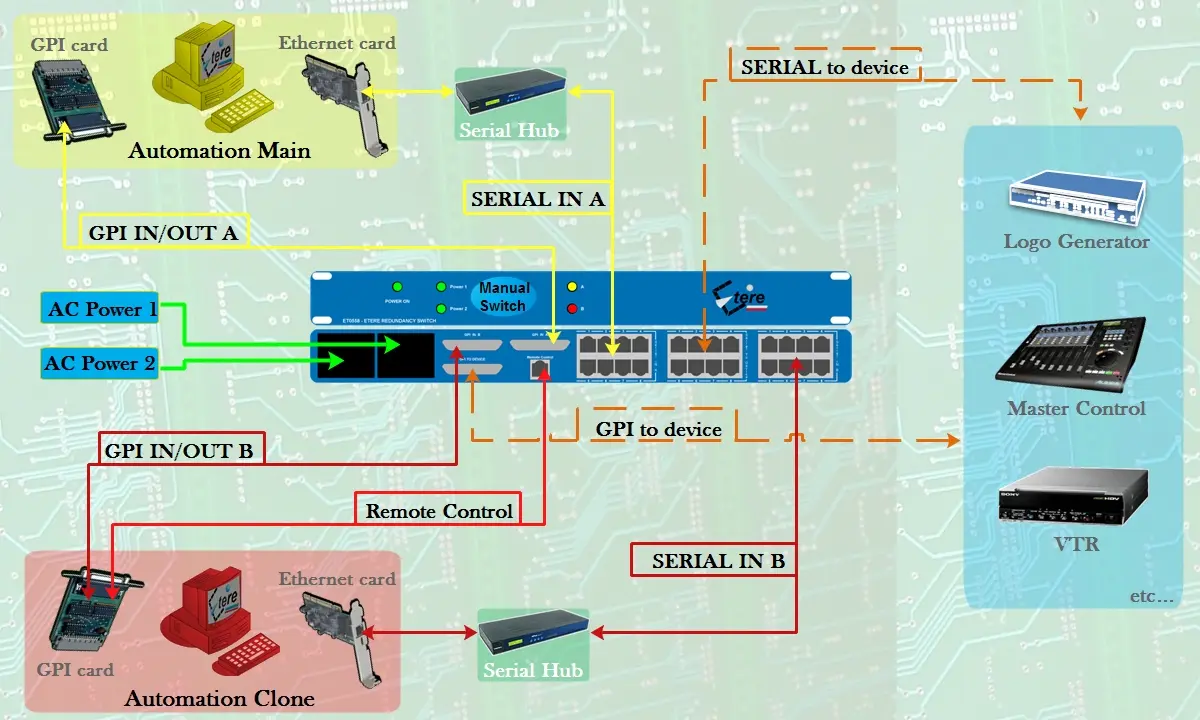 EA_791_Redundancy_Switch