69.2.2.18 INGEST LIST GEN21 XML
Import Scope
The INGEST LIST GEN21 XML import allows to establish a connection with the Gen21 web service to retrieve all information related to the scheduled events which ingest is pending.
Import Parameters
gen21_xml
Path to create temporary XML files from web service: Specify the path.
Import data: Opens the Configure Import window to specify the days and the frequency to be imported.
Scheduling related import
Set the parameters in Etere Scheduling > Import/Export > IMPORT\CUSTOM\GEN21INGESTLISTXML and click on [Save parameters] once done.
Sample file to import
The file to be imported using this method must have the following structure in order to be correctly imported:
<?xml version="1.0" encoding="UTF-8"?>
<GEN21_INVENTORY>
<RESULT COMMAND="GetInventoryForAiring" CHANNEL="1">OK</RESULT>
<MEDIA_FOR_AIRING_LIST CHANNEL="1">
<MEDIA MediaType="Commercial">
<HOUSE_NUMBER>C62871</HOUSE_NUMBER>
<FIRST_AIR_DATE>2013-01-01</FIRST_AIR_DATE>
</MEDIA>
<MEDIA MediaType="Commercial">
<HOUSE_NUMBER>C74598</HOUSE_NUMBER>
<FIRST_AIR_DATE>2013-02-04</FIRST_AIR_DATE>
</MEDIA>
<MEDIA MediaType="Commercial">
<HOUSE_NUMBER>C74599</HOUSE_NUMBER>
<FIRST_AIR_DATE>2013-02-04</FIRST_AIR_DATE>
</MEDIA>
<MEDIA MediaType="Commercial">
<HOUSE_NUMBER>C74616</HOUSE_NUMBER>
<FIRST_AIR_DATE>2013-01-01</FIRST_AIR_DATE>
</MEDIA>
</MEDIA_FOR_AIRING_LIST>
</GEN21_INVENTORY>
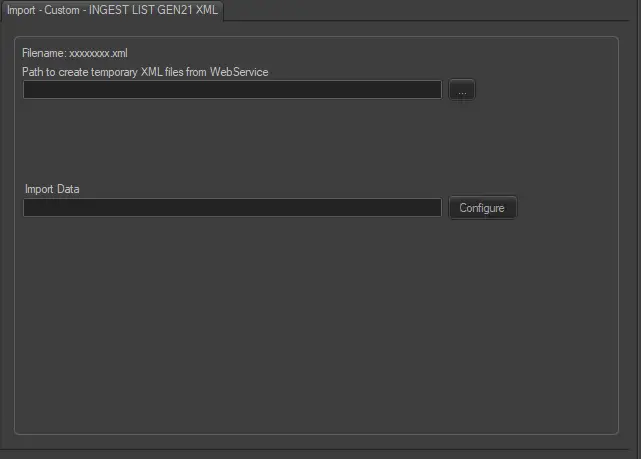 gen21_xml