59.2.49.11 Web Schedule
The Web Schedule section allows setting the broadcast playlist data to be displayed as columns in EtereWeb under the Schedule View section (see EtereWeb > Schedule view).
In this section it's possible to configure the columns that need to be shown every time a broadcasting schedule is viewed in Etereweb.
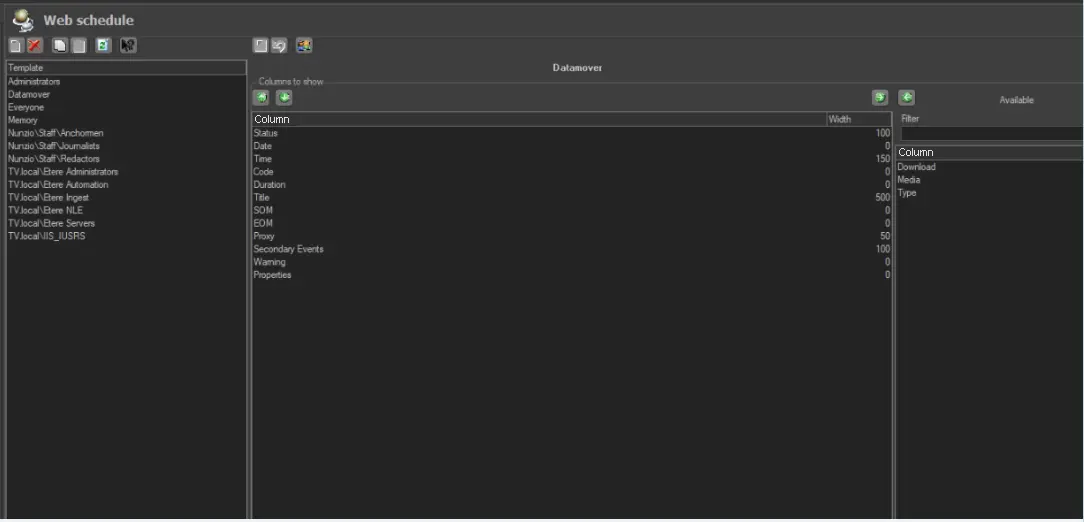
A user template has been deployed to enable the configuration of the Web schedule by user group based on the access rights. A search field (Filter) has been provided to locate the available column for scheduling.
Web_Schedule
The figure above shows that after selecting the user group, an intuitive interface allows the operator to enable or disable columns by moving the selected column from one list to another using the green-arrow buttons.
Moreover, it is possible to specify a preset width for each column intended to be displayed or leave them to their default value (0).
Web_Schedule_-_Template
 Web_Schedule
 Web_Schedule_-_Template