59.3.8.7 Multi framerate
The "Multi framerate" section allows to enabling and configuration of a multi-standard framework to support the use of two or more standard formats for the most common operations related to the production and delivery of assets, including:
Store multiple proxy files with different standard formats for the same asset
Insert EDL points into multiple standard formats
Choose the classic format to browse proxy media
Cut segments according to a selected standard format
Enter video subtitles based on a specific standard format
Insert voice-over audio based on a selectable standard format
Automatic video encoding based on a target standard format
The ability to natively support multiple standards for the same asset is crucial to ensure frame accuracy across all involved media management operations and thus guarantee the reliability of such a complex system. This feature is helpful in, for example, companies that receive a master clip at a specific frame rate (e.g. 24p) to later produce and deliver the material at multiple different standards (e.g. 23.98p, 29.97i, 30p, etc.).
Configuration
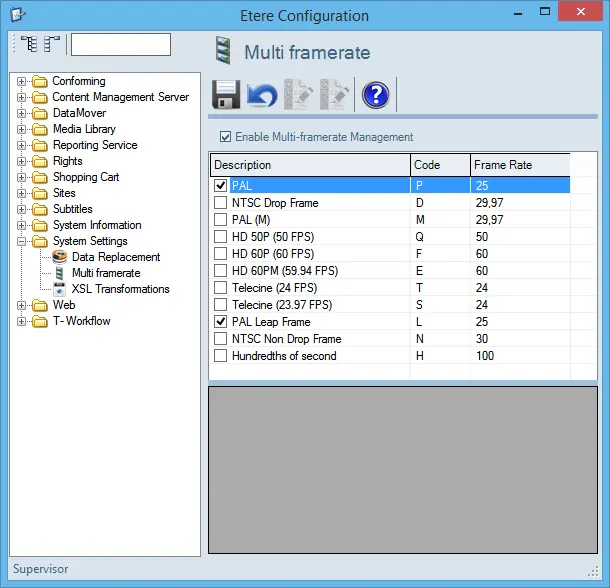
The "Configuration > Conf. Editor > System Settings > Multi framerate" section allows configuring the following parameters:
Multi_framerate
Function: Enable multi-framerate management
Description: If enabled, the "multi-standard" will be enabled across all MAM-related modules (e.g. MAM, DataMover, etc.), not for other modules (i.e. Ingest, Scheduling, Air Sales, etc.).
If disabled, only one "reference standard" will be enabled in the system, the one set in "Configuration > Settings > Basic > System > Video standard" .s
Function: Save
Description: Apply all changes.
Function: Undo
Description: Cancel all changes performed since the last saving.
Function: Regenerate the EDL of all assets
Description: Regenerate the EDL of all assets in the database and make them coherent with the current configuration (i.e. add video standards or remove video standards)
Function: Regenerate the EDL of all assets ONLY for selected video standards
Description: Regenerate the EDL of all assets in the database, adding/removing ONLY the current selected video standard.
Function: Etere Help
Description: Opens Etere Help Manual.
Multi framerate behaviour
In case the multi-framerate is enabled, the system behaviour will mainly consist of the following considerations:
BASIC
•The multi-standard support will rely on a database adequately structured to handle one "reference standard" and multiple "alternate standards."
• "Reference standard" will be used by default for all operations
• "Alternate standards" will be a selectable option available for users.
•All frame rate-dependent information (e.g. EDL marks) in the database will be kept simultaneously in reference and alternate standards, thus preventing "on-the-fly" conversions that may result in inaccurate data.
EDL
•Every EDL will be related to a video standard.
•For EDLs from 1 to 10, the standard is fixed (to the reference standard).
•For EDLs from 11 onwards, the standard is user-defined (reference or alternate).
•All EDL marks will be kept in the database in different versions, one for reference standard (e.g. 43) and others for alternate standards (e.g. 1043, 2043, etc.).
CODECS
•Codecs will be related to a specific standard (e.g. IMX50 NTSC, IMX50 PAL); this will facilitate their recognition and management.
•Codecs will have specific rights; this will allow restricting their visibility/use to specific users.
CODECS
•Subtitles can be imported with a specific frame rate (e.g. NTSC) and exported with any other supported frame rate (e.g. PAL).
T-WORKFLOWS
•As a result of splitting codecs according to their standard format (e.g. IMX 50 NTSC and IMX 50 PAL), existing "transcoding" T-workflow actions will require to know the source/target media codec (e.g. NTSC, PAL) to be used.
 Multi_framerate