59.3.5.2 Configuration Interface
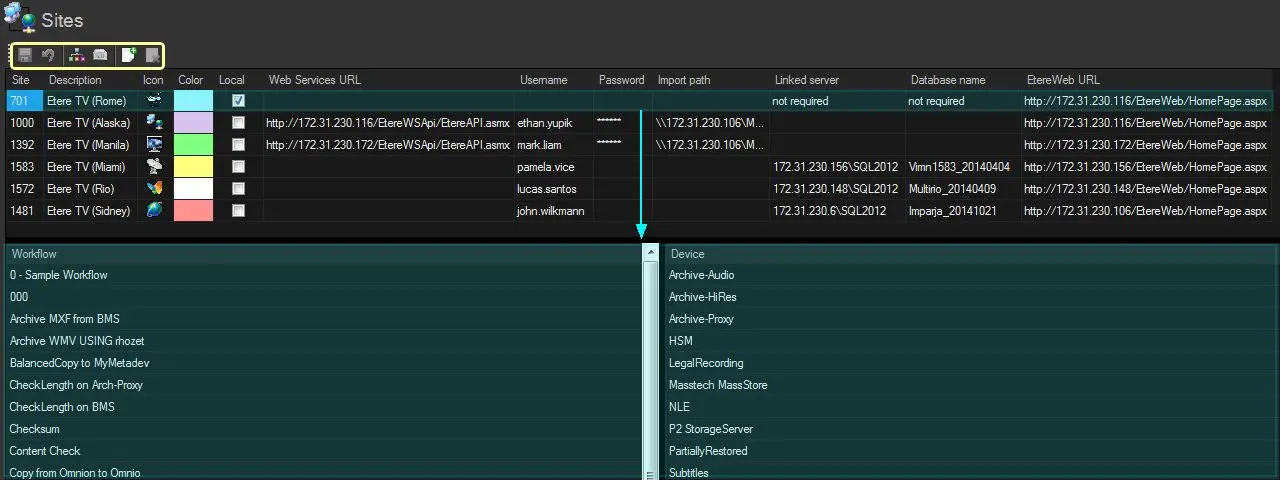
Sites are configured differently depending on whether they are managed through linked servers or web services. The configuration interface is divided into the following three areas to facilitate the management of sites:
Configuration_Interface
LIST OF SITES
This area in the upper part of the window lists all the local and remote sites currently added to the system. For each local/remote location, the following data is managed:
Parameter: Site
Description: This not-editable field shows the unique code of the Etere site (i.e. its license number).
Parameter: Description
Description: Insert a brief text to describe the site.
Parameter: Icon
Description: Assign an icon to each site to make recognizing the belonging site of assets more accessible.
Parameter: Color
Description: Assign a colour to each site; it is helpful to differentiate assets belonging to diverse areas during a search.
Parameter: Local
Description: This not-editable flag indicates whether the site is local (checked) or remote (unchecked).
Parameter: Import path ¹
Description: Double-click to specify the local/network path from which the XML Assets Full import performed by Etere F90 will retrieve data (assets) of this site.
Parameter: Web Services URL
Description: Enter the URL of the remote site's web service, used to retrieve T-workflows and devices in the related lists and subsequently used for remote management.
Parameter: EtereWeb URL
Description: Enter the URL of the remote site's EtereWeb portal, used to search for assets from the desktop through a web-based interface (username and Password set here are used for login). If enabled, a "Site search" option will be available in MAM to allow searching assets on other sites.
Parameter: Linked Server³
Description: Enter the IP address of the SQL Server hosting the database linked to the current one. Linked Servers allow triggering T-workflows through Remote Workflow (linked server) actions. (double-click on this box to list all available servers)
Parameter: Database Name³
Description: Enter the database name (e.g. Etere_Sidney) linked to the current one (e.g. Etere_Rome). (double-click on this box to list all available databases on the chosen server)
Parameter: Username & Password ²
Description: Set here the authentication credentials required by the following features:
Web Services - Enter the username (e.g. mike83) and Password of the Etere account (e.g. Michael. smith) to connect to the web service of the remote site.
Linked Server - Enter only the username (e.g. mike83) of the Etere account (e.g. Michael. smith) to perform operations on the linked server database of the remote site.
EtereWeb - Enter the login name and Password required to access the homepage of the EtereWeb portal of the remote site.
LIST OF T-WORKFLOWS (web services only) - In the bottom left part; this area shows all the T-workflows detected as available from a specific site.*
LIST OF DEVICES (web services only) - This area in the bottom right part shows all the devices detected as available from a specific site.
Notes
¹ Besides being manually added from the "Sites" section, new Etere sites are also automatically added when an asset is imported into the local site from a remote site through the XML Assets Full import function of Etere F90.
² The Web Services URL, Import Path, EtereWeb URL, Linked Server, Database name, Username and Password are required only for remote sites; they can be left out for local sites.
³ The Linked server and Database name are required only when SQL-linked servers are used (on Remote Workflow Action (linked server) actions).
* It's highly suggested to follow the good practices indicated in the Federate Management chapter to prevent data overage issues encountered when attempting to update the T-workflow list of a site with many T-workflows.
Toolbar functions
From the toolbar located at the top of this section, it will be possible to perform the following actions on the currently selected site:
Function: Save
Description: Stores all performed changes in the database.
Function: Undo
Description: Reverts the last unsaved actions.
Function: Update workflow list *
Description: Establishes a connection with the Web Services of the remote site and retrieves all T-workflows authorized for the used login account (i.e. remote T-workflow instances for which the user has rights).
NB: To update T-workflows, the entered URL must be correct, and the provided login account (username and Password must be valid (i.e. not yet expired).
Function: Update devices list
Description: Establishes a connection with the Web Services of the selected site and retrieves the list of all its available devices.
To perform the update, the entered URL must be correct, and the provided Username and Password must be valid (i.e. not yet expired).
Function: Add site
Description: Manually adds a new site (i.e. Etere system) into the database, thus allowing to, for example, manage assets exported to other sites directly on their remote system (through Web Services).
Function: Delete site
Description: Removes the selected site from the list.
 Configuration_Interface