59.2.43.17 Exporting Layouts
The structure of certain metadata layouts can be exported by right-clicking on the metadata and selecting the "Export to XML" function:
Export_to_XML
The exported file will contain the structure in the XML format as follows:
Flexi-metadata_Commercial Assets.xml
<?xml version="1.0" encoding="utf-8"?>
<METADATA_DICTIONARY>
<PARAMETRIC>
<Video_Image_Essence_Characteristics>
<Fundamental_Image_Characteristics>
<Presentation_Aspect_Ratio item="04.01.01.01.01.00.00.00"/>
<Capture_aspect_ratio item="04.01.01.01.02.00.00.00"/>
</Fundamental_Image_Characteristics>
</Video_Image_Essence_Characteristics>
</PARAMETRIC>
<EXPERIMENTAL METADATA>
<Etere>
<Loudness item="04.01.01.01.01.00.00.00"/>
<Asset status item="04.01.01.01.02.00.00.00"/>
</Etere>
</EXPERIMENTAL METADATA>
</METADATA_DICTIONARY>
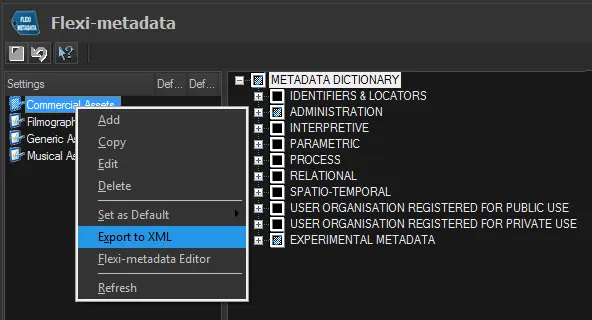 Export_to_XML