Etere Memory
73.2 Memory Setup After Installation
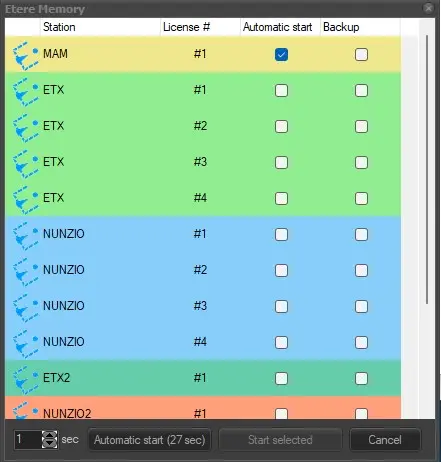
Once Etere Memory has been installed, at the first start of the application, the customer must select the channel he wants to configure then the system starts a wizard procedure to configure the memory to be used on this workstation. Provide the parameters as shown below to complete the setup.
Select the correct channel to be configured
Etere Memory Startup
In the channel selection, you can see the following:
1- The name of the channel is according to the license.
2- Etere Memory TV Stand-Alone quantity according to each channel's license.
NB: To use Etere Memory, you need one of the following licenses, depending on what you need
ET0036 unlimited Etere Memory TV one channel bundled with Etere MAM
or
ET0037 unlimited Etere Memory TV Stand-Alone (price every ingest channel)
3- if the channel is configured to auto-start.
4- if the channel is configured as a backup.
In this window, you can:
1- click on the desired channel and force the manual start
2- wait for the Automatic start countdown, and the system will automatically start the channels where the Automatic Start flag is enabled
3- click on Cancel to close the application startup
Configure Encoder
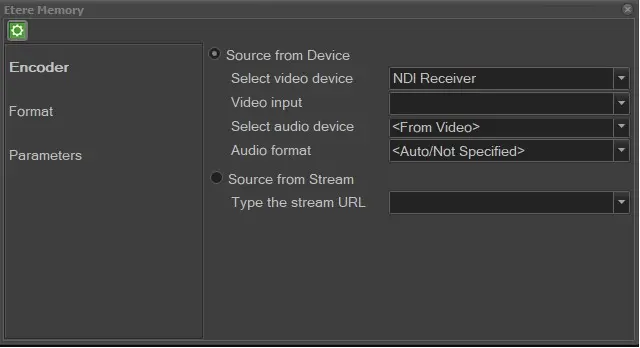
Specify one of the input sources for the Encoder:
Etere Memory 1
➢Source from device
Select video device: select the input video device.
Select video line: select the video line taking from the selected video device.
Select audio device: select the source of audio device. If the same encoder contain both video and audio, select taking the audio <From Video>.
Select audio format: select one of the audio format from the list.
➢Source from stream
Type the stream URL: select to input IP stream from UDP or HTTP.
(Upon configuration, the Windows Media Encoder is no longer required.)
Configure Format
Etere Memory 2
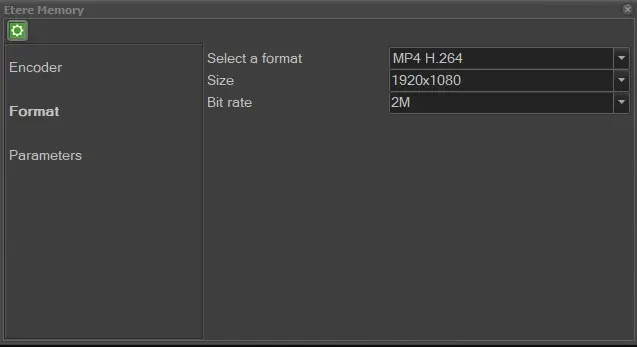
For Format section, 3 possible formats are supported:
- MP4 wrapper with H.264 video
- MPEG2 file (it played and jogged at the same moment it is written)
- WMV file
Etere Memory 3
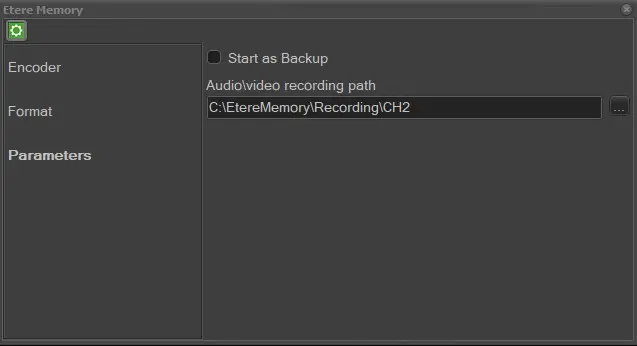
Configure Parameters
For Parameters, select the recording path for audio / video to close the configuration wizard.
Etere Memory 4
 Etere_Memory_Startup
 Etere_Memory_1
 Etere_Memory_2
 Etere_Memory_3
 Etere_Memory_4