59.3.8.1 Data Replacement
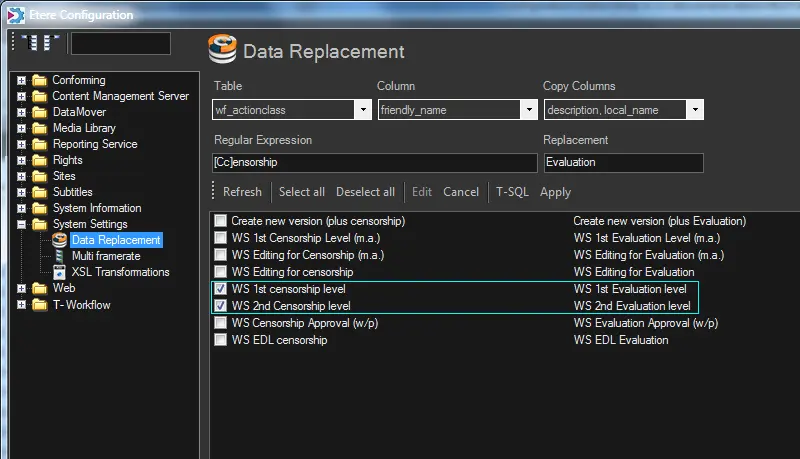
The "Data Replacement" section allows administrators to easily replace the value of any table field matching a regular expression. Data replacement can be easily performed by following the procedure below:
Data_Replacement
1. Select the table (e.g. wf_actionclass) containing the field in which data is intended to be replaced
Note: Please refer to the "Etere tables and fields" chapter for detailed information on the most common data stored in the system database.
2. Select the column (e.g. friendly_name) related to the table field to be replaced
3. Optionally, in the copy columns drop-down list, select more table fields (e.g. local_name, description) to be overwritten with the entire replaced value.
4. Enter the regular expression¹ (e.g. [Cc]ensorship) to be used as the search pattern for matching strings on fields.
NB: For detailed information on regular expressions, please refer to www.regular-expressions.info.
5. Enter the replacement string (e.g. Evaluation) to be set in place of matched strings.
6. Press the [Refresh] button to load the following columns:
Matched values - All entries (field values) match the given regular expression. E.g. WS 1st Censorship (Video)
↓
Replaced values - All entries (field values) are updated with the replacement. E.g. WS 1st Evaluation (Video)
7. Select the entries to which apply the replacement. You can check them one by one as well as use the [Select all] and [Deselect all] buttons.
8. Optionally, use the following functions if required:
[Edit] - Apply a custom replacement to the selected entry.
[Cancel] - Remove all custom replacements, reverting replaced values to the set replacement
[T-SQL] - Copy in the clipboard the query generated by the system to perform the replacement.
9. Make sure replaced values are satisfactory, then press the [Apply] button to make changes take effect.
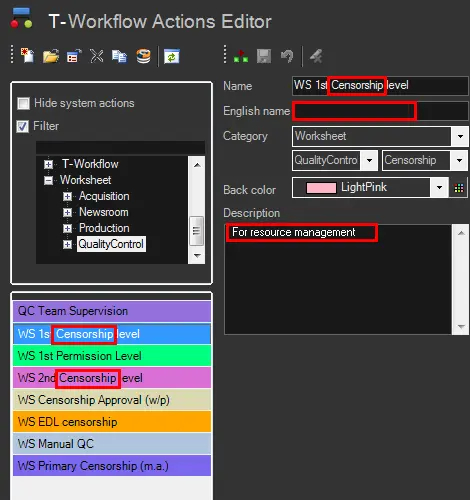
10. All selected entries (field values) will be immediately replaced and copied to specified fields.
replaced_and_copied_to_specified_fields
 Data_Replacement
 replaced_and_copied_to_specified_fields