59.5.4.11 Summary Statement / Tax Invoice
Report Description
The Summary Statement / Tax Invoice report allows to generate a document containing all outstanding invoices (related to the customers of a specific agency) divided into four monthly periods: 0-30 days (current), 30-60 days, 60-90 days and over 90 days. This report includes the current month's VAT and the total amount, which is the sum of all monthly amounts plus the month's VAT.
Report Filters
All the parameters that permit a detailed report generation have been spread across seven different tabs to allow a more manageable configuration. By default, all filters are disabled (i.e., either blank or unselected); to enable them, it is enough to configure at least one parameter inside. Available filters include:
•Period (from date - to date): Specify the period from which data will be retrieved,
•Agency: It allows the agency for which the report is being generated to be specified.
•Only customers with a total greater than 0: Select this option to exclude all those invoices with a zero balance at the run date, that is, invoices whose totals are zero.
Report Preview
The [Settings] permits configuring the page layout of the outgoing document; once filters and settings have been set, it will be possible to select between displaying a preview using the related [Preview] button or printing the document directly using the [Report] button. Please note that some reports permit the export of the generated document in the most common formats (pdf, CSV, doc, xls, XML, etc) just by using the [Export] button.
Summary_Statement_preview
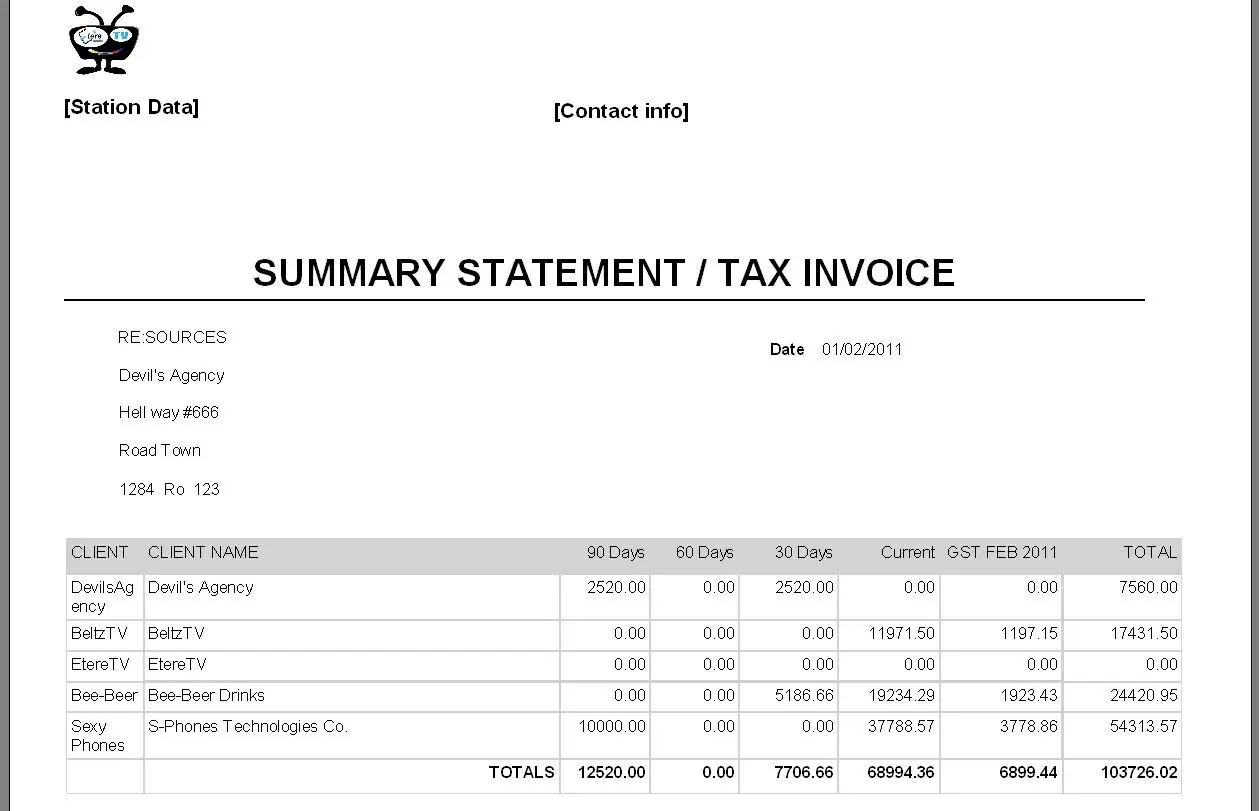 Summary_Statement_preview