87.1.2.1 How to use the Tape Loading
What is the Tape Loading?
The Tape Loading module is a very useful module in case the operator counts with a barcode reader for identifying tapes, this module will allow the operator to enter the tape barcode and immediately view its information and even add it or remove it from a certain Rack.
How to use the Tape Loading?
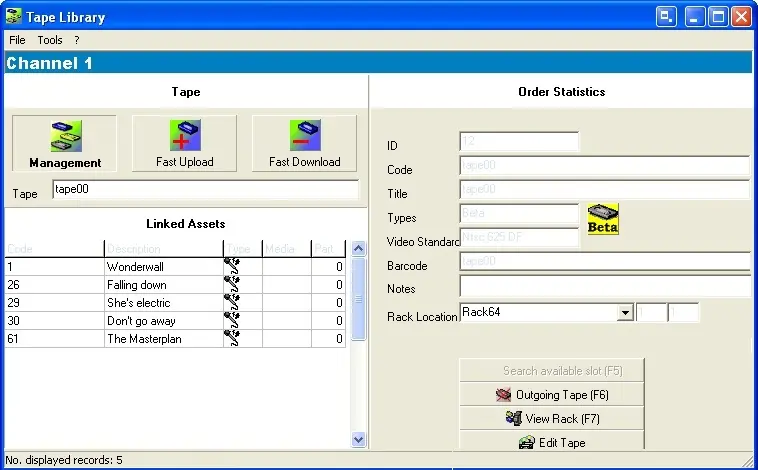
The main interface is a simple window divided in the two parts for an intuitive management, the left part will allow the operator to search and select the tape to be managed and the right part to properly manage the tape:
Sched_tape_library
Tape
Selecting one of the three options in the upper left part of the form it's possible to:
Available functions
Management - Enter the tape barcode to search and consult the tape main information as well as as managing its linked assets forms.
Fast Upload - automatically search for the first available rack position and assigns the tape to it.
Fast Download - Automatically removes the tape from the rack position to which it has been assigned.
Order Statistics
Under this section it will be possible to consult the main tape's information as well as performing some key operations:
Tape information
ID - The unique and not editable number used by Etere to identify the tapes within the library.
Code - The editable (making double-click) code used by the operator to identify one tape from the others.
Title - A brief text that will help operators to identify the type of content within the tape.
Tape type - Indicate if the type to which the tape belongs among those created under Etere Configuration > Settings > Basic > Tape Types.
Media format - Select the media format (among those created under Etere Configuration > Settings > Basic > Media formats) which corresponds to the tape.
Video standard - Specify the standard of video of the tape content (e.g.: PAL, NTSC, etc).
Note - Brief extra descriptive text.
Rack location - Location in the rack with the relative position of the assigned slot.
Available functions
Automatic calculation of the first free slot that can be assigned
Remove the tape from the rack (e.g. in case its being removed from the library)
View the rack on which the tape is currently stored.
Opens the Tape Manager module to allow viewing and editing the tape recording information.
 Sched_tape_library