91.6.5 Output Renderer
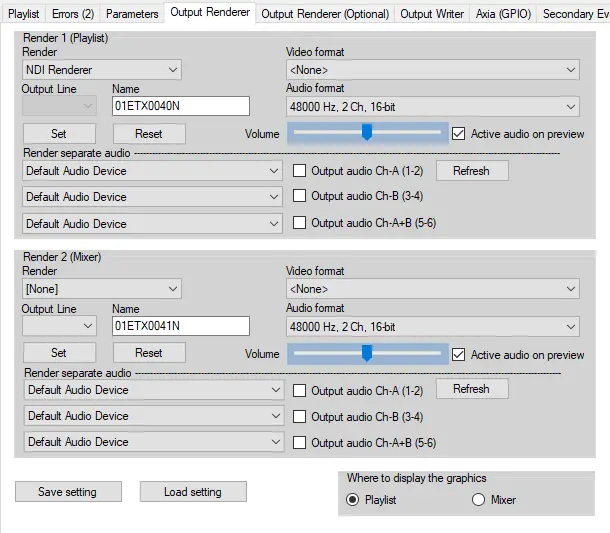
The Output Renderer tab lists two renderer sections, Render 1 (Playlist) and Render 2 (Mixer), adjustable both for type of stream, video and audio format, and options to render separate audio.
These are the parameters available for each Render section:
Render - Select the type of renderer (SDI, NDI, WebRTC).
Name - Name of the output signal. By default it's named with the string "01ETXyyyyN", where the 4 "y" characters indicate the channel number.
Video format - Select the format of the video.
Audio Format - Select the format of the audio.
Volume - Set the output volume level.
Active audio on preview - Enables the user to hear audio from a preview in local workstation.
Renderer separate audio - for every checked audio configuration (Ch-A, Ch-B, Ch-A+B, check chapter "parameters" in order to set them), select from the combo box the audio device that will play the separate audio stream
Once all the needed parameters have been set, click the button Save setting to confirm and keep them even after the module is restarted.
Where to display the graphics - This parameter allow to choose where the graphics (selectable from the tab Graphics in Radio playout) should be sent.
If set to Playlist, the graphics will be sent on both Render 1 (Playlist) and Render 2 (Mixer).
If set to Mixer, the graphics will be sent only on Render 2 (Mixer).
Note: This parameter is applied only to graphics, not scenes. Changing this setting, in order to have effect, requires a restart of Radio Live Engine.
 output_renderer