ETX-G Live Playout
66.9.1 Overlay Graphic in ETX-G
ETX-G supports “Keying” modes to overlay graphics; there are two types of Keying, namely “Internal Keying” and “External Keying”.
- Internal Keying
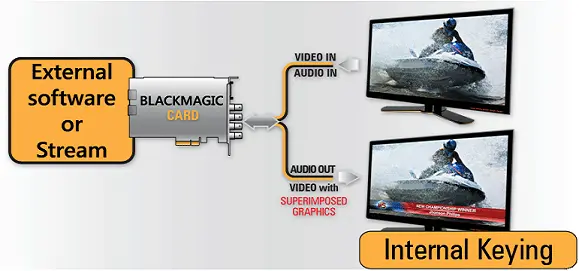
In Internal Keying mode, an external software or external stream will set the Blackmagic card to superimpose the graphics over the incoming signal, as illustrated in the image below.
Etx-g_internal_keying
Configure the following settings when adding graphic overlays using Internal Keying mode:- Set color space of the playlist to ARGB32.
- Set the output resolution equal to the input resolution.
- Make the frames transparent by setting a source object background to “transparent”.
- External Keying
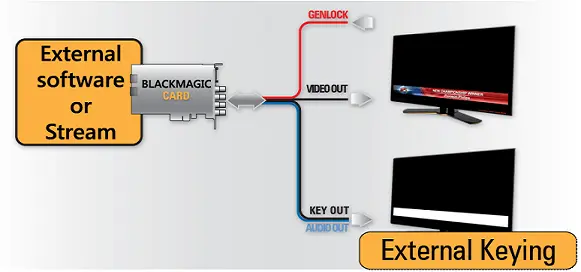
In external Keying mode, an external software or stream sets the Blackmagic card to generate video and key SDI signals; the Keying is made by an external keyer as a master switcher, as illustrated below.
Etx-g_external_keying
For External Keying mode, configure the following settings (similar to Internal Keying):- Set color space of the playlist to ARGB32.
- Set the output resolution equal to the input resolution.
- Make the frames transparent by setting a source object background to “transparent”.
- Supported Devices
- Blackmagic Design Device - Intensity Extreme
Internal: No
External: No
HD Keying: No
4K Keying: No - Device - Intensity Pro
Internal: No
External: No
HD Keying: No
4K Keying: No - Device - Intensity Shuttle
Internal: No
External: No
HD Keying: No
4K Keying: No - Device - Decklink 4K Extreme
Internal: Yes
External: Yes
HD Keying: Yes
4K Keying: No - Device - Decklink 4K Extreme 12G
Internal: Yes
External: Yes
HD Keying: Yes
4K Keying: Yes - Device - Decklink 4K Pro
Internal: Yes
External: Yes
HD Keying: Yes
4K Keying: Yes - Device - Decklink Duo
Internal: Yes
External: No
HD Keying: No
4K Keying: No - Device - Decklink Duo 2
Internal: Yes
External: Yes
HD Keying: Yes
4K Keying: No - Device - Decklink HD Extreme
Internal: Yes
External: Yes
HD Keying: Yes
4K Keying: No - Device - Decklink HD Extreme 3D
Internal: Yes
External: Yes
HD Keying: Yes
4K Keying: No - Device - Decklink Mini Monitor
Internal: No
External: No
HD Keying: No
4K Keying: No - Device - Decklink Mini Recorder
Internal: No
External: No
HD Keying: No
4K Keying: No - Device - Decklink Optical Fibre
Internal: Yes
External: No
HD Keying: No
4K Keying: No - Device - Decklink Quad
Internal: Yes
External: No
HD Keying: No
4K Keying: No - Device - Decklink Quad 2
Internal: Yes
External: Yes
HD Keying: Yes
4K Keying: No - Device - Decklink SDI 4K
Internal: Yes
External: No
HD Keying: Yes
4K Keying: No - Device - Decklink SDI
Internal: Yes
External: No
HD Keying: No
4K Keying: No - Device - Decklink Studio 4K
Internal: Yes
External: Yes
HD Keying: Yes
4K Keying: No - Device - UltraStudio 3D
Internal: Yes
External: Yes
HD Keying: Yes
4K Keying: No - Device - UltraStudio 4K
Internal: Yes
External: Yes
HD Keying: Yes
4K Keying: No - Device - UltraStudio 4K Extreme (12G)
Internal: Yes
External: Yes
HD Keying: Yes
4K Keying: Yes - Device - UltraStudio Express
Internal: No
External: No
HD Keying: No
4K Keying: No - Device - UltraStudio Mini Monitor
Internal: No
External: No
HD Keying: No
4K Keying: No - Device - UltraStudio Mini Recorder
Internal: No
External: No
HD Keying: No
4K Keying: No - Device - UltraStudio Pro
Internal: Yes
External: Yes
HD Keying: No
4K Keying: No - Device - UltraStudio SDI
Internal: No
External: No
HD Keying: No
4K Keying: No
- Blackmagic Design Device - Intensity Extreme
 Etx-g_internal_keying
 Etx-g_external_keying