59.5.4.16 Orders
Report Description
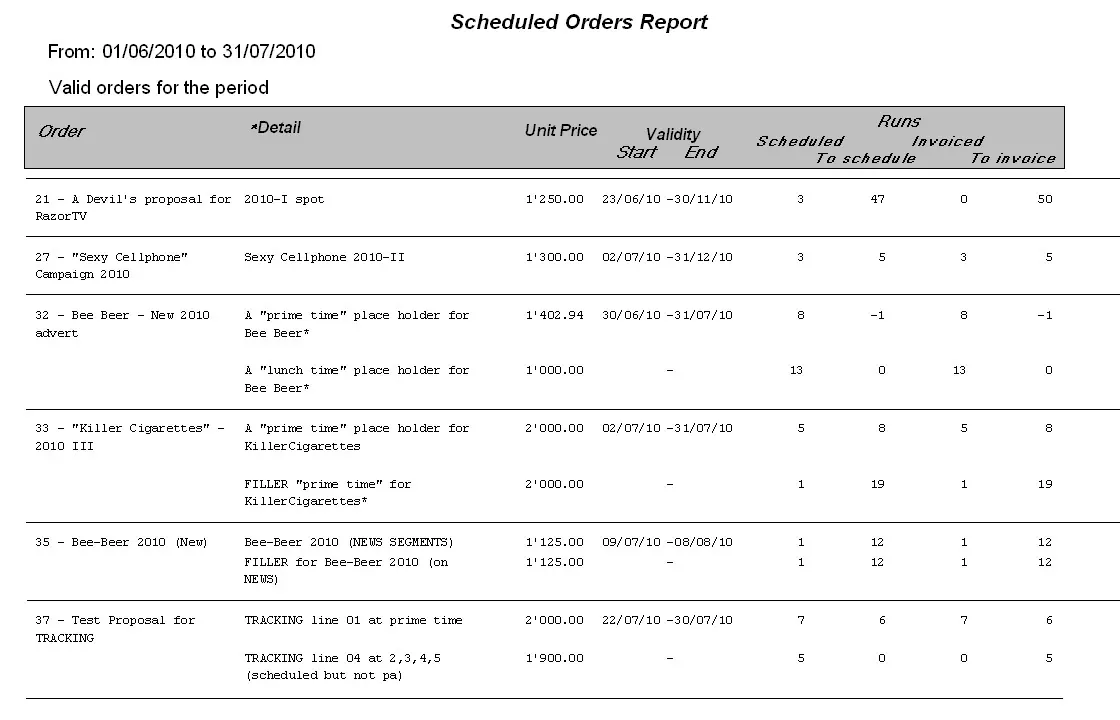
The Orders report allows the generation of a list of all scheduled orders meeting a set of filters; this report will include the scheduled order line, the unit price, the validity start and end dates, and the scheduling and invoicing situations.
Report Filters
All the parameters that permit detailed report generation have been spread across seven different tabs to allow for easier configuration. By default, all filters are disabled (i.e., they are either blank or unselected); to enable them, it is enough to configure at least one parameter on their inside. Available filters include:
•Reference dates: If enabled, it will be possible to specify the period to be taken into account for generating defined orders (see below for 'orders types'),
•Data filter: Disabled by default, this parameter allows to filter retrieved orders by indicating either theory code or description,
•Account Executive: Specify the account executive that must be part of retrieved orders,
•Category: Narrow the report to a specific product category (e.g., cellphones, beer, cars, etc),
•Agency: Indicate the agency which must be included in the orders to be retrieved,
•Duration (from-to): Use it to narrow the report to only those orders featuring lines with a duration between the specified parameters,
•Order types: Indicate the type of orders for which the report is intended, that is:
-Valid orders for the period: There will be retrieved all orders which are valid for the reference date specified above,
-Currently expired orders: There will be retrieved all orders which are expired for the current system date, that is, not valid,
-Currently valid orders: All orders valid for the current system date will be retrieved; they have not yet expired.
•Report date: If enabled, the data will be displayed in the footer of each page,
•Page number: If enabled, the consecutive page number will be displayed in the footer of each page,
•Sort by Dictate if artists' appearances will be sorted either by order, lines, start date, limit date, scheduled runs or runs to be scheduled,
•Station: Choose the station from which order data will be retrieved,
•Split: Select the split network to which the orders to be retrieved are related.
Report Preview
The [Settings] permits configuring the page layout of the outgoing document; once filters and settings have been set, it will be possible to select between displaying a preview using the related [Preview] button or printing the document directly using the [Report] button. Please note that some reports permit the export of the generated document in the most common formats (pdf, CSV, doc, xls, XML, etc) just by using the [Export] button.
Scheduled_orders_report
 Scheduled_orders_report