208.3.2 Active Requests
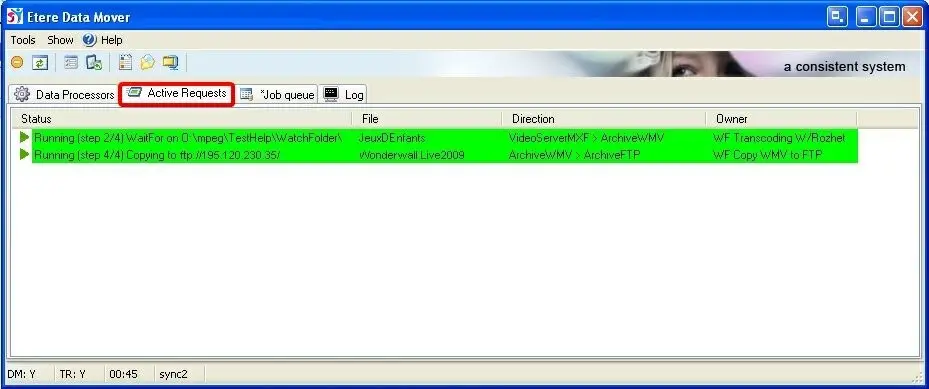
The Active Requests tab display all the accepted requests and requests currently in progress.
Active Requests
User Interface
In the interface, active requests are highlighted in green. The details information of the currently active requests includes:
•Status: display information regarding the progress status (i.e. details of the current T-workflow step).
•File: The name of the file currently in process.
•Direction: The source and destination devices of the process.
•Owner: Name of the T-workflow that execute the Data Mover action.
For better monitoring of processes, user can click on any request item to display the progress status of the currently running process, including the date and time the process is started, sequence of events, e.g. starts of file transmission, percentage of transmission in progress, transmitted file size, and process completion time. The archive and restore process by DataMover can also be monitored.
The request can be sent from a 64-bit Windows workstation to a 32-bit workstation.
Available functions
By right-click on requests, modification are allows:
•Open display: Display the activities and its configuration settings (it displayed on Configuration Editor in Read-Only mode) of the selected action.
•Reset: Reset all the jobs which are currently using this action.
•Abort: Abort all the jobs which are currently performing the selected action.
•Abort all: Abort ALL the currently running actions..
•Switch online/offline: Set the Data Mover actions to online (actions will be available) or offline (action won't be available for future requests) depending on the current state.
 Active_Requests