84.4.4.86 CUSTOM > TL KING
Export Scope
The TL KING export function allows stations to generate one XML file containing a list of commercial orders scheduled within a given date range and ready to be invoiced; including their essential contractual information (e.g. order lines, cost per run, commercial description, total runs per commercial, etc.).
This export function can be used, for example, to export the Etere's Air Sales data to another system (e.g. Oracle JDE) .
Export Parameters
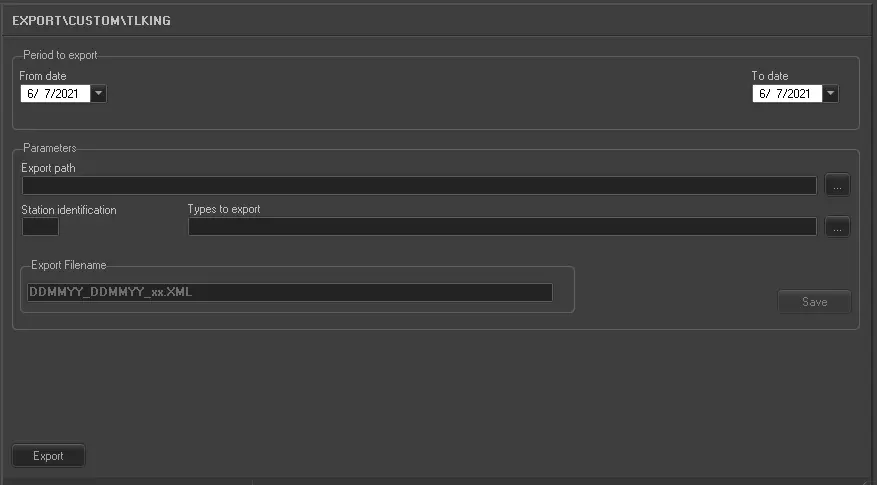
Under this section it is possible to specify the following parameters on which the export operation will be based:
Export_custom_tl_king
•Period (from date - to date): Specify the time range on which orders will be analyzed to check if they are "to be invoiced",
•Export Path: Indicate the folder on which exported files will be stored,
•Station identification: Indicate a two-characters ID to be append at the end of the filename, thus making the exported file recognition easy.
•Types to export: In case it is intended to export only a certain type of details (e.g.: commercial, clip, promo, etc), indicate here the related type(s),
•Export filename: Exported files will be automatically named using the format: ddmmyy_DDMMYY_XX.xml, where:
- ddmmyy is the day, month and year of the starting date for exporting data
- DDMMYY is the day, month and year of the ending date for exporting data
- XX is the station ID previously specified.
Launch the export
Once the export has been configured, it can be started just by pressing the <Export> button. The exported XML file will mainly contain the period and the customer(s) to which scheduled commercials are related:
<PERIOD>
<CUSTOMER-01>
...
<Order-01>
<Account Executive#1>...<MainAccount Executive>
<Account Executive#2>...<MainAccount Executive>
<Spot#1> ...</Spot#1>
<Spot#2> ...</Spot#2>
...
</Order-01>
<Order-02>
...
</Order-02>
</CUSTOMER-01>
<CUSTOMER-02>
...
<CUSTOMER-02>
...
</PERIOD>
As shown above, for each customer it will be detailed -besides its personal data- also the order(s) on which the commercials scheduling was based. Additionally, each order will be formed by the -up to two- related Account Executive involved in the order as well as the various scheduled spots derived from the order.
Sample exported file
010911_300911_TL.XML
<?xml version="1.0" encoding="UTF-8"?>
-<PERIODO station="TL" al="30-09-2011" dal="01-09-2011">
-<CLIENTE>
<COD_CONTO>235</COD_CONTO>
<RAG_SOCIAL>BARILLA SPA</RAG_SOCIAL>
<VIA>VIA ORTI MANARA, 9</VIA>
<CAP>37100</CAP>
<CITTA>VERONA</CITTA>
<PROVINCIA>VR</PROVINCIA>
<STATE>ITALY</STATE>
<PART_IVA>03211144231</PART_IVA>
<COD_FISC>03211144231</COD_FISC>
<TELEFONO>045-1109980</TELEFONO>
<FAX>045-1112133</FAX>
<E_MAIL>info@barilla.com</E_MAIL>
<TIPO_CLI>I</TIPO_CLI>
<TIPO_DITTA>10</TIPO_DITTA>
<COD_BANCA>INTESA</COD_BANCA>
<DES_BANCA>BANCA INTESA SAN PAOLO SPA</DES_BANCA>
<ABI>03069</ABI>
<CAB>09400</CAB>
<CC>11111111111111111</CC>
<CIN>N</CIN>
<IBAN>IT96N0306909411111114196712</IBAN>
<COD_BANCA/> <DES_BANCA/> <ABI/> <CAB/> <CC/> <CIN/> <IBAN/>
<COD_BANCA/> <DES_BANCA/> <ABI/> <CAB/> <CC/> <CIN/> <IBAN/>
<COD_BANCA/> <DES_BANCA/> <ABI/> <CAB/> <CC/> <CIN/> <IBAN/>
<COD_BANCA/> <DES_BANCA/> <ABI/> <CAB/> <CC/> <CIN/> <IBAN/>
-<CONTRATTO>
<COD_CONTR>4018TL</COD_CONTR>
<DESCR_CONTR>PASTA BARILLA SUMMER 2011</DESCR_CONTR>
<TIPO_CONTR>S</TIPO_CONTR>
<CODICE_PAGAMENTO>66</CODICE_PAGAMENTO>
<DESCRIZIONE_PAGAMENTO>BONIFICO 90</DESCRIZIONE_PAGAMENTO>
<CODICE_IVA>20</CODICE_IVA>
<DESCRIZIONE_IVA>IVA AL 20%</DESCRIZIONE_IVA>
-<AGENTE_PRINCIPALE>
<COD_CONTO>ORSINI</COD_CONTO>
<RAG_SOCIAL>Orsini - NET 1</RAG_SOCIAL>
<VIA>Via Umberto I n. 20</VIA>
<CAP>26010</CAP>
<CITTA>DOVERA</CITTA>
<PROVINCIA>CR</PROVINCIA>
<STATE>ITALY</STATE>
<PART_IVA>01133390197</PART_IVA>
<COD_FISC>AAABBB58E29E648E</COD_FISC>
<TELEFONO>321321321</TELEFONO>
<FAX>9879879879</FAX>
<E_MAIL>orsini@interfree.it</E_MAIL>
<TIPO_CLI>I</TIPO_CLI>
<TIPO_DITTA>10</TIPO_DITTA>
</AGENTE_PRINCIPALE>
-<SUB_AGENTE>
<COD_CONTO/>
<RAG_SOCIAL/>
<VIA/> <CAP/>
<CITTA/>
<PROVINCIA/>
<STATE/>
<PART_IVA/>
<COD_FISC/>
<TELEFONO/>
<FAX/>
<E_MAIL/>
<E_MAIL_INV/>
<TIPO_CLI/>
<TIPO_DITTA/>
</SUB_AGENTE>
-<SPOT>
<COD_SPOT>PLOC2471</COD_SPOT>
<DESC_SPOT>PASTA BARILLA - ORECCHIETTE</DESC_SPOT>
<TIPO_SPOT>PLOC</TIPO_SPOT>
<TIPO_PAGA>PAY</TIPO_PAGA>
<NUM_PASSAGGI>4</NUM_PASSAGGI>
<DURATA>30</DURATA>
<COSTO_PASSAGGIO>37,00</COSTO_PASSAGGIO>
<IMPORTO>148,00</IMPORTO>
<NOTE> </NOTE>
</SPOT>
-<SPOT>
<COD_SPOT>PLOC2471</COD_SPOT>
<DESC_SPOT>PASTA BARILLA - SPAGHETTI N.5</DESC_SPOT>
<TIPO_SPOT>PLOC</TIPO_SPOT>
<TIPO_PAGA>FREE</TIPO_PAGA>
<NUM_PASSAGGI>1</NUM_PASSAGGI>
<DURATA>30</DURATA>
<COSTO_PASSAGGIO>1000,00</COSTO_PASSAGGIO>
<IMPORTO>1000,00</IMPORTO>
<NOTE> </NOTE>
</SPOT>
</CONTRATTO>
</CLIENTE>
-<CLIENTE>
...
-<CONTRATTO>
...
</CONTRATTO>
</CLIENTE>
</PERIODO>
¹ : S=STANDARD, R=Instalments, C=Exchange of goods, A=Exchange of goods by instalments.
² ³ : PAY=Paid program, FREE=Free program
 5195_Export_custom_tl_king