79.4.7.1 Shortcuts
The Shortcuts section centralized all available shortcuts in single location, where you can assign different shortcuts to different groups of users, including Editor, Journalist and Anchormen group. When the specific shortcut is assigned to the specific group, the shortcut is available to all users in the group.
Shortcuts
From the Shortcuts node select a specific function in the panel and move the mouse to the Editor, Journalists, or Anchormen group column where you want to assign the shortcut to the specific group.
From the list of available function keys you can assign a shortcut key to the selected function. The selected shortcut key must not already assigned or in used by other functions or other user group in the list.
Once the shortcut is assigned to the specific user group, the shortcut is available to all users in the specific group in all workstations. The settings would take effect upon Etere Maintenance when Nunzio is relaunch.
Other available function in the Shortcuts panel includes:
- Save Shortcut - (Ctrl + S): Save all the settings applied to the shortcuts assignment.
- Cancel Shortcut - (Ctrl + Z): Cancel the new settings applied and revert to previous settings.
- Restore default values Shortcut: Restore all default values for shortcuts settings.
- Refresh Shortcut - (F5): Refresh the Staff shortcut view if update is available.
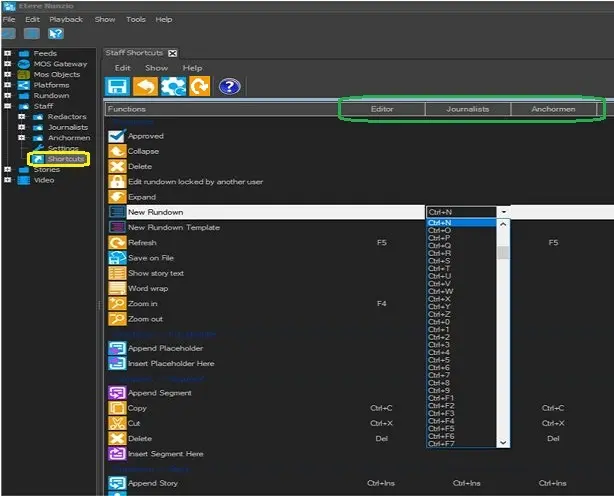 Shortcuts