77.2 How to configure a service via WEB
The configuration of an Etere Ingest Service is performed through the Etere Web Interface, where all service parameters are managed centrally.
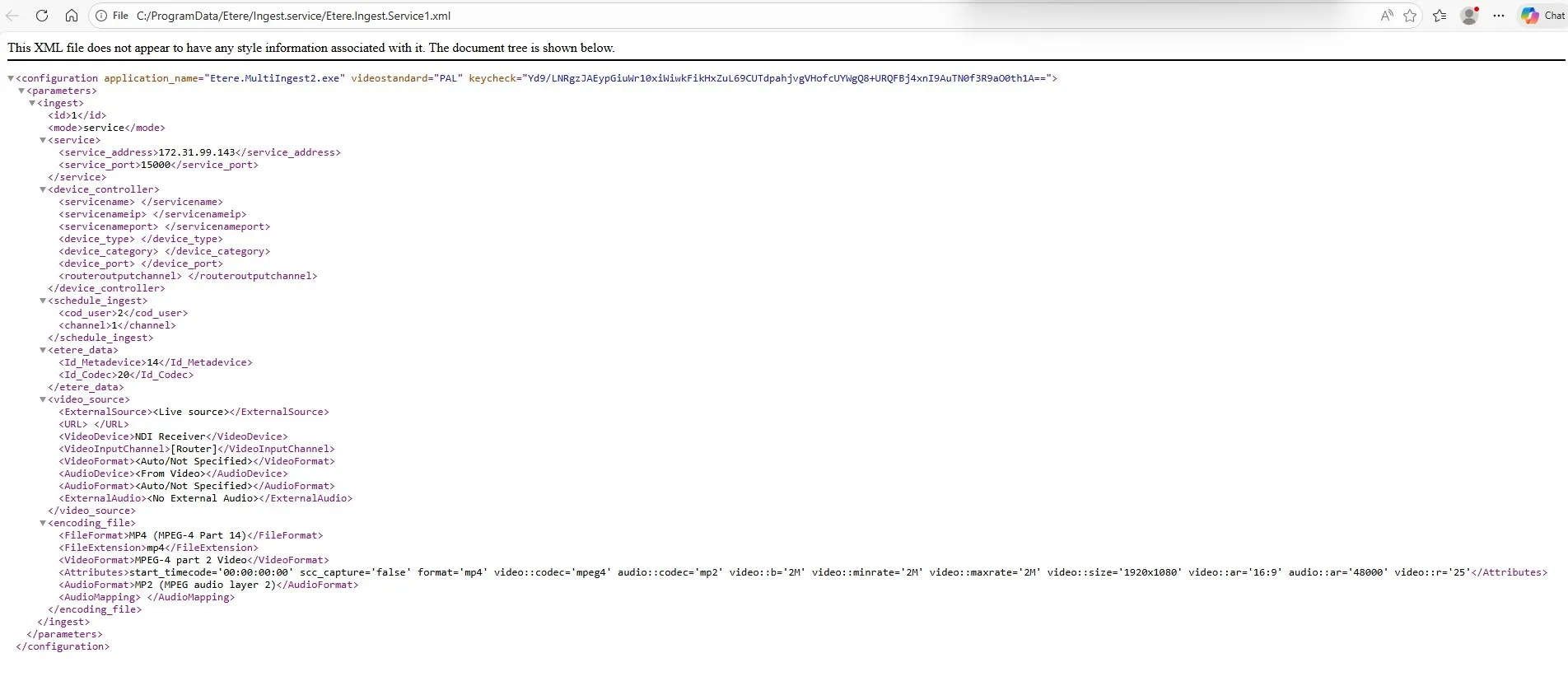
When services are installed via Etere Update, the system automatically generates a corresponding XML configuration file for each service instance. By default, these XML files are created in:
C:\Program Files (x86)\Etere
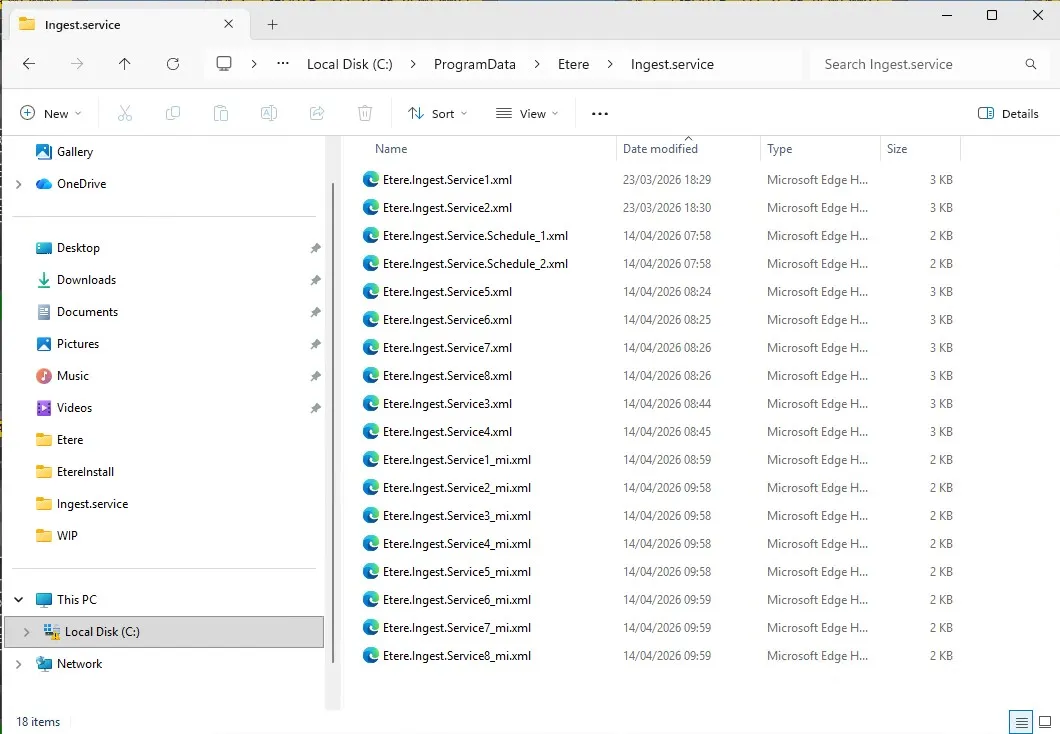
After the initial configuration is completed and the service is properly applied, the XML files are automatically moved to the following directory:
C:\ProgramData\Etere\Ingest.Service
Each XML represents a single ingest service configuration and must not be edited manually, as all modifications are handled exclusively via the Web interface.
Access to Service Configuration
After logging into Etere Web with a user authorized to modify service settings, navigate to:
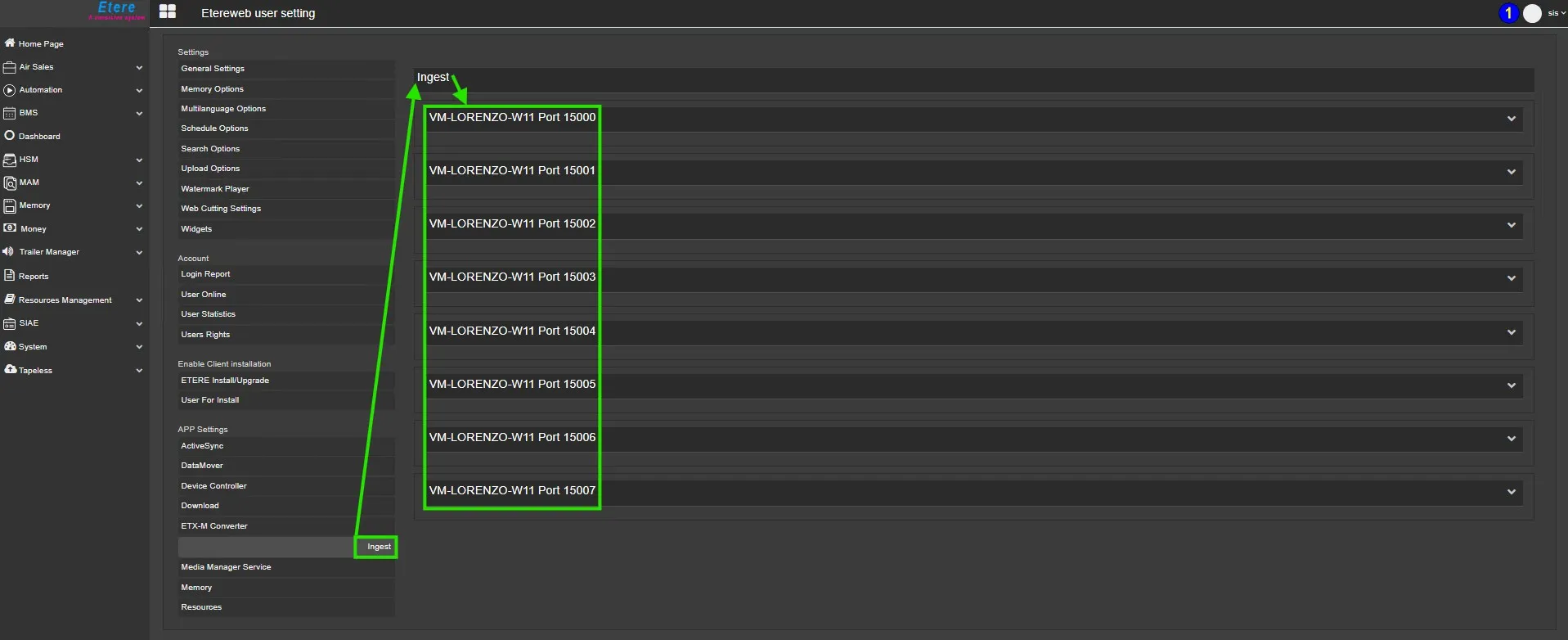
User → User Preferences → App Settings → Ingest
On this web page, all Etere
Ingest services are listed in alphanumeric order, sorted first by host name and
then by port number.
Each node represents a service running on a specific server and includes a unique communication port, used to identify the associated ingest channel.
Service Port Mapping
- Port 15000 → Service 1 / Channel 1
- Port 15001 → Service 2 / Channel 2
- Port 15002 → Service 3 / Channel 3
- Port 15003 → Service 4 / Channel 4
- Port 15004 → Service 5 / Channel 5
- Port 15005 → Service 6 / Channel 6
- Port 15006 → Service 7 / Channel 7
- Port 15007 → Service 8 / Channel 8
This mapping allows precise identification of each ingest instance.
Configuration Sections
Each ingest service is configured through a set of structured parameter groups.
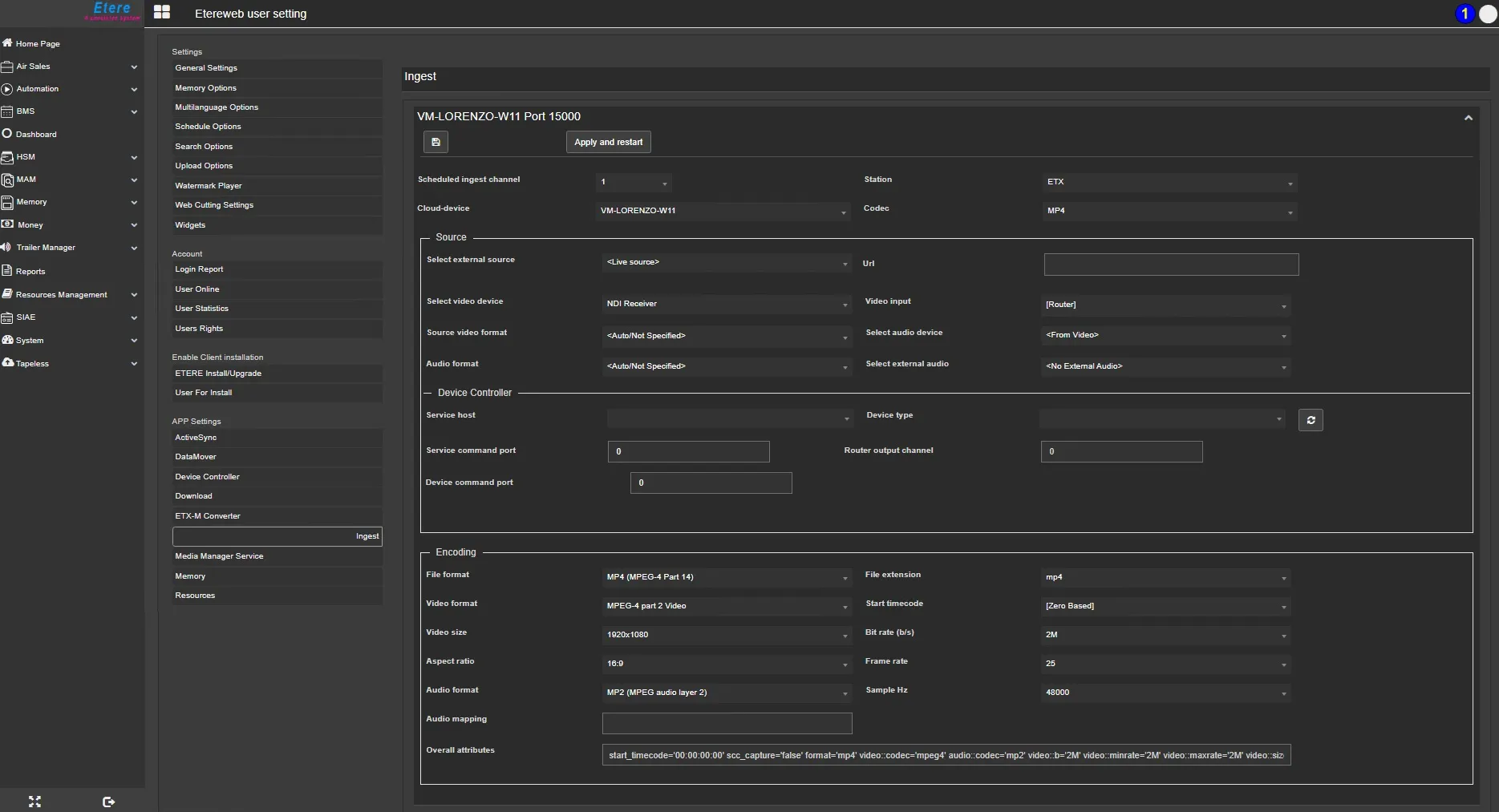
1. Scheduled Ingest and Etere Data
- Scheduled ingest channel: Defines which channel ID is used by the service when operating in Scheduled Ingest mode.
- Cloud device: Selects the storage destination for recorded files.
- Codec: Defines the codec applied to ingested media files.
- Station: Defines the channel where this service can be used.
NB: The settings for the Scheduled ingest channel and the Station must be entered if you wish to use the service for scheduled recordings as well; otherwise, the service can only be used for manual recordings.
2. Source
Defines the input signal configuration:
- Select video device: Chooses the hardware device used for video input
- Video input: Selects the physical or logical input channel
- Source video format: Defines input format or sets automatic detection
- Select audio device: Chooses the audio source device or inherits from video
- Audio format: Defines the audio format or disables audio if not present
- Select external audio: Enables external audio source if required
3. Device Controller
Manages interaction with external control systems and routing:
- Service host: IP address of the server running Etere Device Controller Service
- Service command port: Communication port between ingest service and controller
- Device command port: Port used to control the physical device
- Device type: Specifies the controlled device model/type
- Router output channel: Defines routing output for signal switching
4. Encoding
Defines output media format and technical parameters:
- File format and extension: Output container format
- Video format: Final video encoding format
- Start timecode:
- Zero-based (00:00:00.00)
- Or source-based timecode
- Zero-based (00:00:00.00)
- Video size: Output resolution
- Bitrate: Encoding bitrate
- Aspect ratio: 16:9 or 4:3
- Frame rate: Output frame rate
- Audio format: Audio encoding format
- Sample rate: 44.1 kHz or 48 kHz
- Overall attributes: Summary of configured encoding parameters
Saving and Applying Configuration
Once all parameters are defined, two actions are available:
- Save: Stores configuration in the Etere database without applying it to the service
- Apply and Restart:
- Saves configuration to database
- Updates the service XML file
- Restarts the service to apply changes immediately
- Saves configuration to database
Important Notes
- Service XML files must only be modified via the Web interface
- Manual editing of XML files is not supported and may cause system inconsistencies
- Recommended Windows Service recovery settings:
- First/Second/Subsequent failures: Restart the service
- Reset fail count after: 0 days
- Restart service after: 0 minutes
- First/Second/Subsequent failures: Restart the service
Summary
Etere Ingest Services are configured through a structured web-based workflow that links each service instance to a dedicated configuration XML. All parameters are managed via the Web interface, ensuring centralized control, while the final configuration is applied through the Apply and Restart process, which synchronizes database settings and service runtime behavior.
Important Note:
Each service is designed to operate either in manual recording mode or in scheduled recording mode; concurrent use in both modes is not supported.
During the scheduling process, the system evaluates both the start time and the recording duration to identify any potential overlaps within the timeline. Should an overlap be detected, the system will generate a notification to inform the client, thereby helping to prevent possible recording conflicts or data loss.
Additional Note:
During the scheduling phase, user permissions and station assignments are strictly enforced. If a user is connected and operating under a specific station (e.g., Station 1), to which certain channels are assigned (e.g., Channel 1 and Channel 2), the user will be allowed to schedule recordings exclusively for that station.
To prevent configuration errors and ensure operational consistency, the system will display only the channels associated with the currently selected station, thereby restricting access to channels assigned to other stations.
 Ingest_Services_Running
 Configure_an_Ingest_Service
 ProgramData_Etere_IngestService
 IngestXMLStructure