84.4.5.66 CUSTOM > MEDIASET EDL ASSET
Import Scope
The Import Custom Mediaset EDL Asset import assets exported from “AssetDataNew” database table in external database into Etere database and update the asset status.
The import is performed adhere to the following criteria:
•The import is done periodical upon request.
•If the asset does not exist in Etere database, the asset would be skipped.
•The asset’s physical marks (INF_DIGIT and DUR_FISICA) must be defined. If the marks does not exist in Etere database, the asset would be skipped.
•If the asset contain MarkIn and MarkOut but without interruption, the asset would be compared to asset in Etere database. The asset would only updated if they are different.
•The asset EDL would only updated if they are greater than the EDL in Etere database.
•The double lines in database table would be skipped.
•The import does not coincide with the solar day, it import from 6am on current day to 6am next day.
Import Parameters
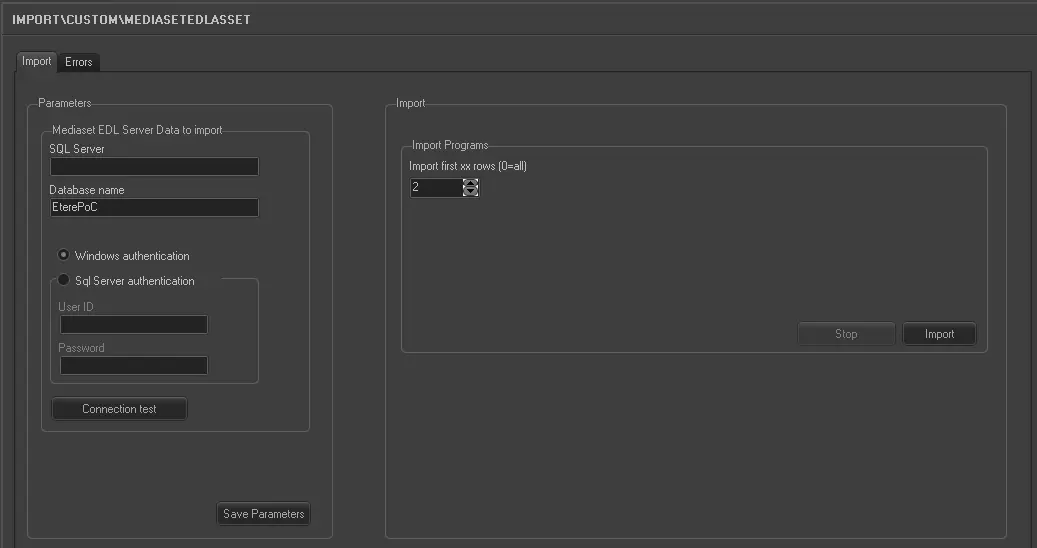
Import_custom_mediaset_edl_asset
Mediaset EDL Server Data to import:
•SQL Server: Specify the SQL Server name.
•Database Name: Specify the name of the external database in SQL Server to be imported.
oWindows authentication: Select this option if the importation would be authenticated by Windows user ID and access rights created in Windows Active Directory.
oSQL Server authentication: Select this option to authenticate the import based on the user ID created in target SQL Server. You are required to provide the user ID and password for authentication.
•Use the “Connection test” feature to establish the connection to the Mediaset EDL SQL Server.
Use the <Save Parameters> button to save the parameters entered above.
Import Programs:
• Import first xx rows (0= all): Specify the number of rows to be imported. Or set the value to “0” to import all rows in the file.
Launch the Import
When all parameters had been fulfilled, click the <Import> button to start the import process.
 5277_Import_custom_mediaset_edl_asset