84.4.4.35 STANDARD > SIAE DOR CSV
Export Scope
The Export Standard SIAE DOR CSV export SIAE DOR scheduled data within specific period into a CSV format file. The CSV file contains data columns separated by semicolon (;). The columns in the file includes
•Schedules date range
•Issuer name
•Channel name
•Time slot of prime time
•Export path
NB: If there are more than one author in the exported file, the authors would be separated by dash (-).
Export Parameters
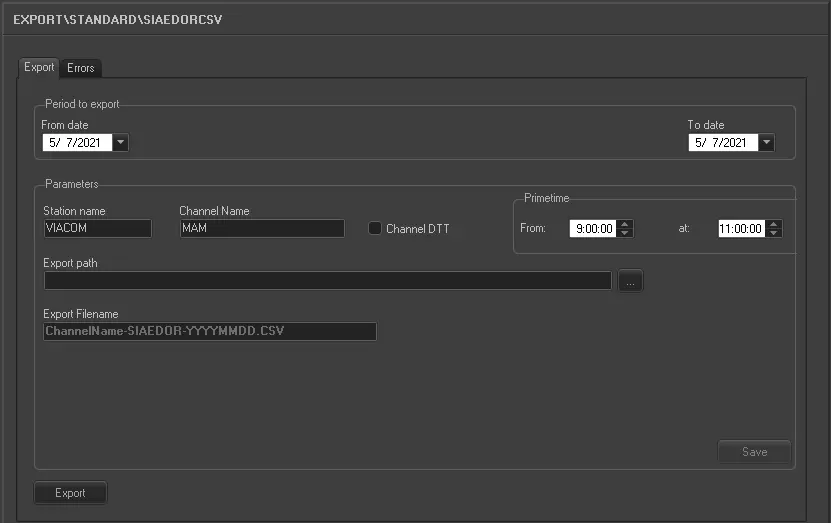
Export_standard_siae_dor_csv
Period to export:
•From date:
select a date from the calendar to indicate the start date for export.
•To date: select a date from the calendar to indicate the end date for export.
Parameter:
•Station name: The name of station where export was triggered.
•Channel name: The channel used to perform the export.
•Channel DTT: This option is useful for identifying the scheduled events in the exported file for data calculation, it determine if events were replicated or first execution.
•Export path: Indicate the directory path where the exported CSV file would be stored. You can use the browse button to locate the path in network.
•Export filename: Define the file name for the exported file. The filename format is: "ChannelName-SIAE DOR-YYYYMMDD-YYYYMMDD.csv"
- where first “yyyymmdd” indicate the start date for export, second “yyyymmdd” indicate the end date for export
•Time slot of the Prime Time: Specify the prime time in the evening time slot to export the schedule.
Launch the Export
Once all the parameters has been configured, click the <Export> button to start the export.
 5100_Export_standard_siae_dor_csv