59.2.39.5 Creating a Virtual Router
Each station can create as many virtual routers as needed, for instance, 2 virtual routers for the main and clone automation:
Virtual Router - Main Virtual Router (C1)
Managed sub-routers : Master Control (MTX MC1) / Video Router (C3)
Virtual Router - Backup Virtual Router (C2)
Managed sub-routers : Master Control (MTX MC2) / Video Router (C3)
Follow the procedures described below to create a new virtual router:
1. Open the Etere's Configuration > Resources module, press [Add Resources] and select the virtual router(s) from the Video Routers category:
Add_Resources
2. Give the resource(s) a name (e.g. Master Virtual Router), and the driver would be automatically set to VRouter (virtual routeR). Confirm the creation and the resource(s) will be added to the Resource's tree:
creation_and_resource
3. Create the physical routers (e.g. Quartz, MTX MC, etc.) to be managed by the virtual router; then, drag and drop them into the virtual router as shown in the figure below (they will be added as "linked resources"):
linked_resources
Note
The following considerations must be taken into account when dragging and dropping routing resources (video router, master control) into virtual routers:
•Routing resources are not directly added to virtual routers, but only a linked version of them
•A routing resource can be used for more than one virtual router
•Linked resources cannot be modified; changes must be performed to the original routing resource
•Wrong linked resources can be removed from the virtual router by right-clicking on them and selecting "delete."
•Besides the virtual router, also linked resources (not original) need to be assigned to the automation
4. Assign the virtual router and its linked routers (e.g. Quartz and MTX MC) to the automation by selecting each resource, pressing the [Users] button and adding the "automation" or "automation clone" users(s):
adding_automation
5. At this point, follow the instructions stated in the Configuring a Virtual Router chapter for configuring the virtual router (and its managed sub-routers).
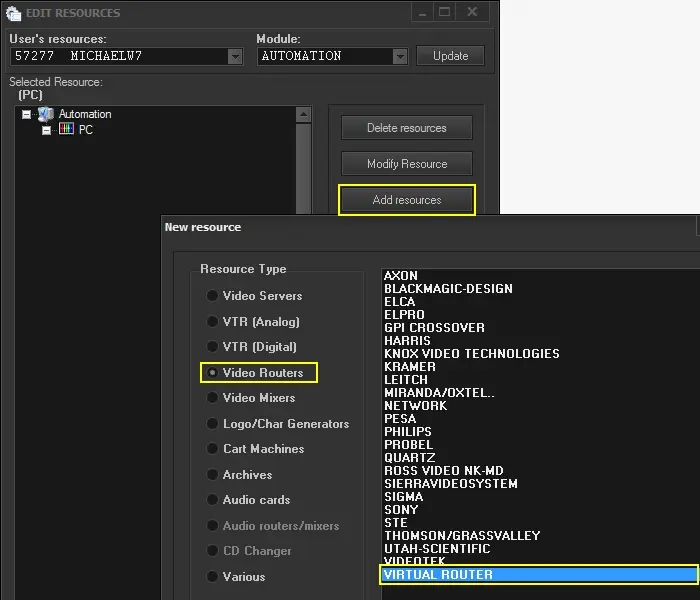 Add_Resources
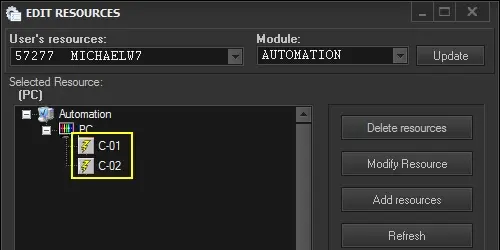 creation_and_resource
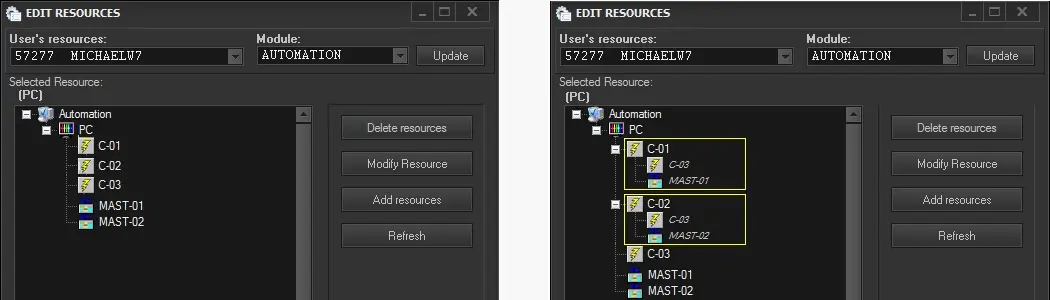 linked_resources
 adding_automation