Playback
79.3.1.2 Playback Configuration
Select Playback > Configuration to launch the Etere Nunzio Configuration Wizard.
Configuration 1
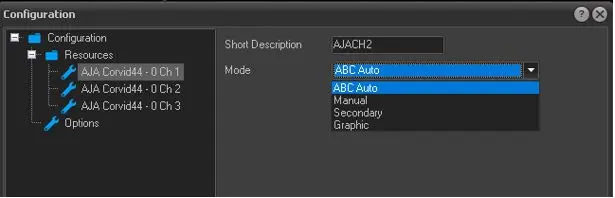
Under the Resources node, select the resource to be configured.
- Short Description: Enter a short description for the playout channel to be displayed in the header of device panel.
- Mode: Select one of the output mode from the list.
- ABC Auto: Back-to-back mode videos are loaded and played in sequential order.
- Manual: Allow operator to determine the playout order in device panel.
- Secondary: Allows to assign channel as secondary video.
- Graphic: Allow to assign channel as Graphic channel (for ETX-G only)
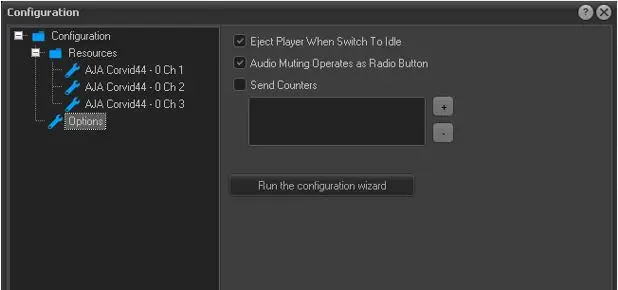
- Eject Player when switch to idle: Enable this option to release the decoder when it's not used for playout.
- Audio muting operate as radio button: Enable this option to allow audio for channel in play and automatically mute other channels in playing.
- Send counters: Use the '+' button to add counter via UDP to a remote display.
- Run the configuration wizard: When this button is click, a message would be prompt indicate that the initial playout configuration wizard would be launched when Nunzio is restarted.
Under the Options node, more configuration options are available.
Configuration 2
 Configuration_1
 Configuration_2