59.5.4.21 Orders Status by Customer
Report Description
The Orders status by customer report allows the generation of a document containing all orders valid for a certain period, detailing for all their lines their scheduling status, total runs, remaining runs, scheduled runs, transmitted runs, and all scheduled runs present in white and black lists.
Moreover, this report allows for data filtering by agency, customer, and order to narrow the information to specific criteria.
Report Filters
All the parameters that permit a detailed report generation have been spread across seven different tabs to allow a more manageable configuration. By default, all filters are disabled (i.e., either blank or unselected); to enable them, it is enough to configure at least one parameter inside. Available filters include:
•Start by Specify the month and year from which data will be retrieved, indicate if it will be the current month, the previous month or a custom period,
•Agency: Specify the agency that forms part of the orders intended to be retrieved,
•Customer: It allows the customer to be specified for which the analysis will be generated.
•Order: It allows the narrowing of the report to a specific order.
Option:
To schedule events only: If this option is enabled, only events with positive or negative numbers in the "To Schedule" column will be included in the report.
Report Preview
The [Settings] permits configuring the page layout of the outgoing document; once filters and settings have been set, it will be possible to select between displaying a preview using the related [Preview] button or printing the document directly using the [Report] button. Please note that some reports permit the export of the generated document in the most common formats (pdf, CSV, doc, xls, XML, etc) just by using the [Export] button.
Orders_Status_by_Customer_preview
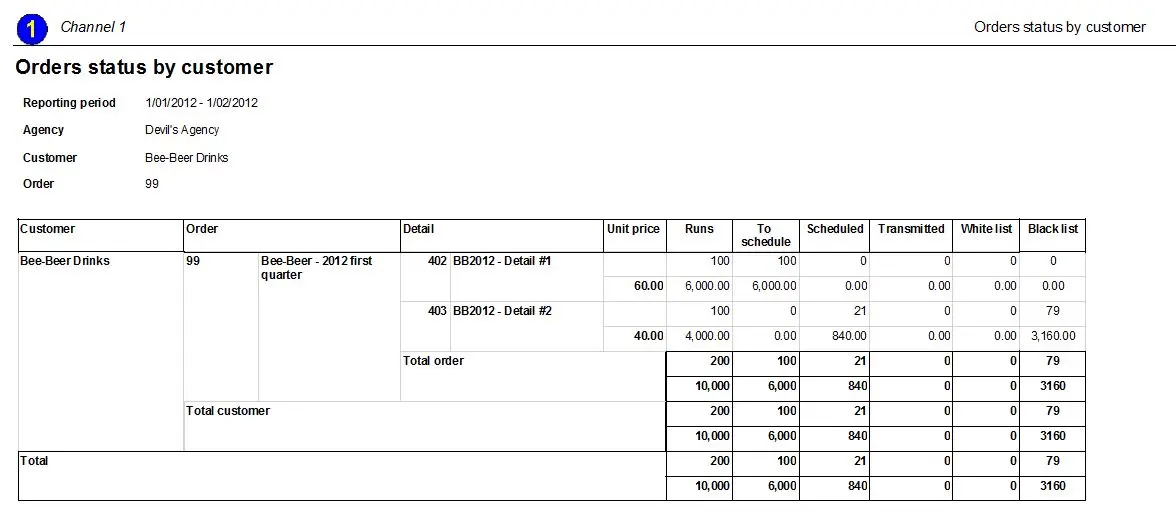 Orders_Status_by_Customer_preview