84.5.2 Required settings
Before start using this module, you have to set the 'classes' of the objects to be checked, a 'class' is a group of asset types which is used for broadcast certification purposes, they are used to filter and process during the verification, only those events matching the asset types included in the active class.
Define the filtering classes
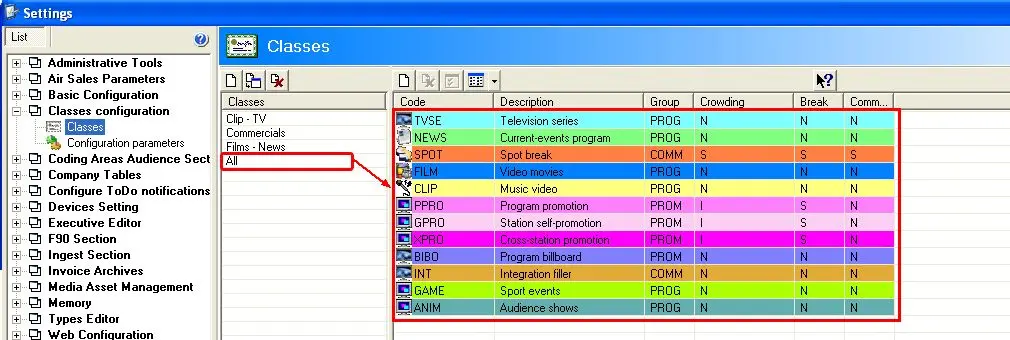
In order to create a new class or edit an existing one as well, just go to 'Etere Configuration | Settings | Classes Configuration | Classes' section, through this module you will be able to add/remove asset types from the selected Class:
Sched_classes
Set the analysis parameters
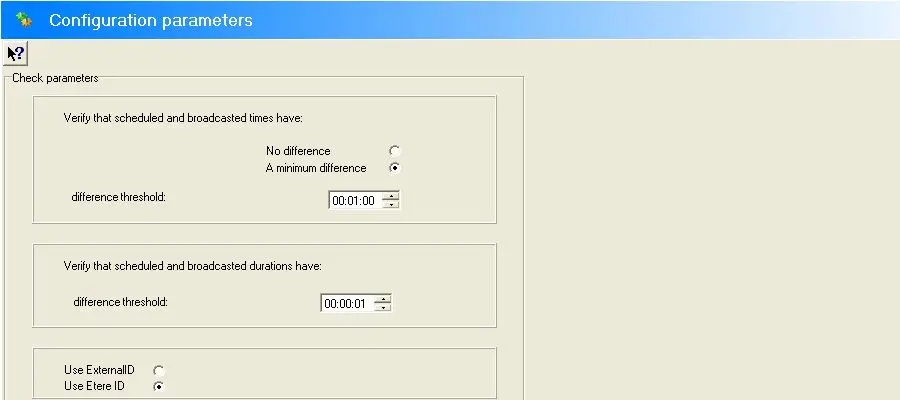
Going to the Etere Configuration | Settings | Classes Configuration | Configuration parameters section, it will be possible to define some important criteria to be taken into account when certifying schedules, these parameters are described below:
Sched_classes_02
•Verify that scheduled and broadcasted durations have: Indicate the criteria to be used to consider a duration difference as incorrect:
- No difference: All duration differences will be pointed out.
- A minimum difference: If enabled, there will be pointed out, only those differences (between broadcasted and scheduled durations) greater than the difference threshold (hh:mm:ss) specified here.
•Verify that scheduled and broadcasted times have: Specify here (hh:mm:ss) the minimum difference threshold (hh:mm:ss) that differences (between broadcasted and scheduled times) must have in order to be pointed out.
•Use External ID / Use Etere ID: Indicate if assets present in the programming schedules should be identified based on their Etere ID (e.g.: assets created using Etere) or on their External ID (e.g.: assets imported from other systems).
 5318_Sched_classes
 5317_Sched_classes_02