72.2.3.4 View Quarterly Scheduling
It allows to view when the selected asset is scheduled. A 3-months calendar allows to view the details of the scheduling on the respective dates.
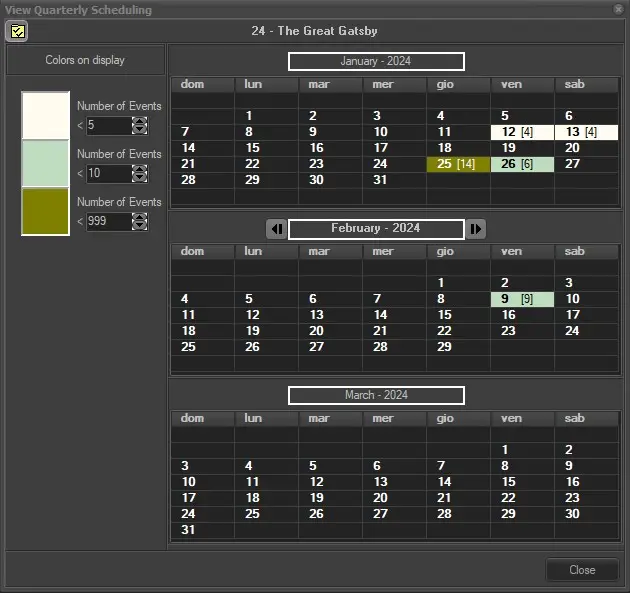
The schedule days where the asset is programmed are highlighted with colors according to the number of events, as the legend shows on the left of the window.
In the example below, the asset is scheduled 4 times on 12/01/2024 and 13/01/2024, so the days are colored in white. It is scheduled 6 times on 26/01/2024 and 9 times on 09/02/2024, so the days are colored in light green. It is scheduled 14 times on 25/01/2024, so the day is colored in dark green.
Colors can be changed double-clicking on them in the column "Colors on display". Here is possible to define also the number of events threshold, under which the calendar days will be highlighted with the corresponding color.
View Quarterly Scheduling
By right clicking on a particular date where the asset is scheduled and selecting 'View details', you can see the time the asset is scheduled with audience and share details (if previously associated to the related air sales segment).
 view_quarterly_scheduling