59.5.8.30 Transmission Report by Category
Report Description
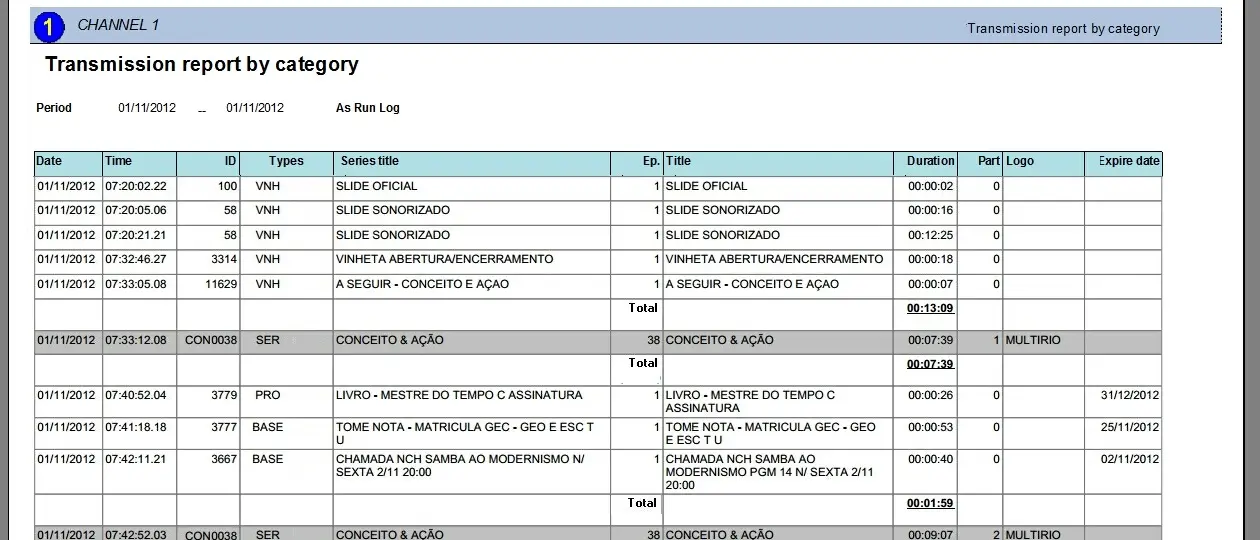
The Transmission Report by Category report allows to generate a document containing all events transmitted on a certain period, specifying the total duration of clustered events (i.e. events groups in commercial clusters) as well as graying out unclustered events (i.e. which are not grouped in any cluster).
It's worth mentioning that a label will indicate -depending on whether the start date is in the past or future- if the report is related to either an "As-run log" or a "Transmission report" respectively.
Report Filters
All the parameters that permits a detailed generation of the report have been spread across seven different tabs to allows an easier configuration. By default all filters are disabled (i.e.: they are either blank or unselected), to enable them it is enough to configure at least one parameters on their inside. Available filters includes:
•Date: Specify the dates of the playlists for which the report will be generated, that is, from which data will be retrieved.
Report Preview
The [Settings] permits to configuration the page layout of the outgoing document; once filters and settings have been set it will be possible to select between displaying a preview using the related [Preview] button or printing the document directly using the [Report] button:
Columns legend
Date - Scheduled date of the event
Time - Scheduled time of the event
ID - Identification number of the event
Type - Asset type of the event (e.g. TVSE, COM, FILM, etc)
Season title - Title of the scheduled event
Episode - For season episode, indicates the episode number
Title - Description of the scheduled event
Duration - Scheduled length of the event
Part - The exploded part number of exploded events
Logo - Shows the logo(s) associated to the event
Expire date - Limit for the validity of the event transmissions
Please note that some reports permit to export the generated document in the most common formats (pdf, csv, doc, xls, xml, etc) just by using the [Export] button.
automation_transmission_report_by_category_preview
 automation_transmission_report_by_category_preview