59.5.8.20 Q1 Statistics Module
Report Description
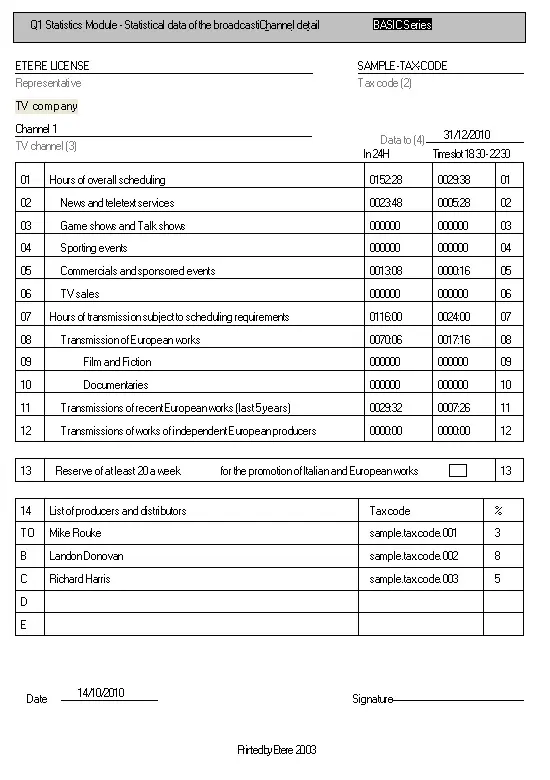
The Q1 Statistics Module allows you to generate a document containing all your company's statistical data by compiling a few intuitive fields.
Report Filters
All the parameters that permit detailed report generation have been spread across seven different tabs to allow for a more straightforward configuration. By default, all filters are disabled (i.e., either blank or unselected); to enable them, it is enough to configure at least one parameter inside. Available filters include:
•Representative: This fixed parameter indicates that the report is related to the Etere License,
•Tax code: Insert the tax code of the representative to which the report is aimed,
•TV Channel: This fixed parameter indicates the station in which (and for which) the report is being generated,
•From date - to date: Indicate the date interval from which scheduling data present in the report will be retrieved,
•Reservation of at least 20 minutes per week for the promotion of Italian and European works:
•List of producers and distributors: Insert the name, tax code and percentage of up to five producers and representatives.
Please note that all ministerial types (1, 2, 3, ... 20, etc.) must be set in the proper section (Etere Configuration | Settings | Types), as well as all those events on which it has not been enabled, thus avoiding unwanted types on your reports.
Additionally, if left blank, all 14 fields related to the producers & distributors list will be automatically calculated.
Report Preview
The [Settings] permits configuring the page layout of the outgoing document; once filters and settings have been set, it will be possible to select between displaying a preview using the related [Preview] button or printing the document directly using the [Report] button. Please note that some reports permit the export of the generated document in the most common formats (pdf, CSV, doc, xls, XML, etc) just by using the [Export] button.
Automation_Q1_Statistics_Module
 Automation_Q1_Statistics_Module