74.5.2.1 ANNOVA - Configuring
1. Launch the Annova's OMIS console, enter your server name and user credentials,
2. Expand the 'OMIS Service Instances' and stop the service which is running with 'MOS Video' (right-click & stop)
3. Expand the 'OMIS Plugin Types,' select the 'MOS Dummy Driver' option and make right-click on 'MOS Gateway Video,' and go to the properties
4. In the configuration tab 'MOS Device,' it will be possible to set the following data:
- MOS ID: Set the same MOS ID specified in Etere MOS Gateway,
- Hostname: Set the IP address of the server where Etere MOS Gateway is installed,
- Ports: Set the ports used by the Etere MOS Gateway for communicating MOM (media object messages) and RO (running orders) objects.
5. Once done, select 'Apply,' then 'OK' and start the service from the OMIS-Services again
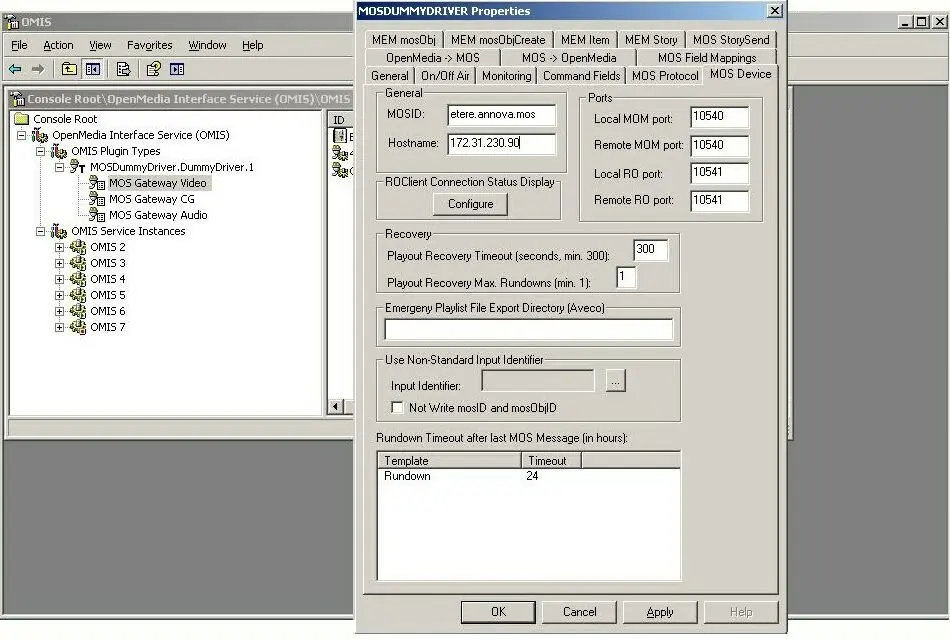 Annova_config03